Belkin USB-C Hub Review: Versatile but Heat-Prone
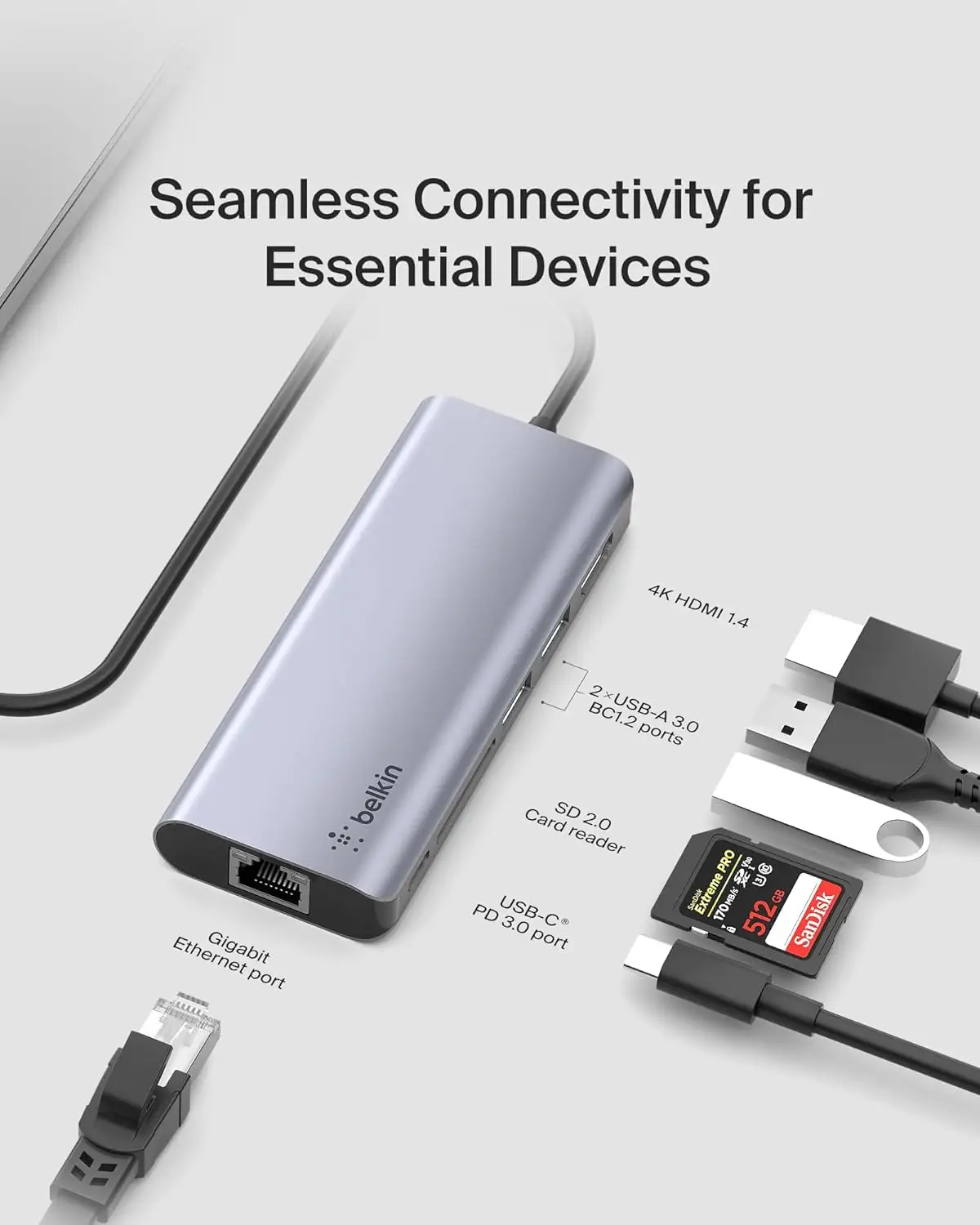
A verified buyer on Amazon summed up their experience bluntly: “I actually love this device… the SD card port, power, and HDMI were gravy. All ports work as they should. My one complaint is the device can get very hot when it’s in use.” The Belkin USB C Hub 6‑in‑1 MultiPort Adapter Dock earns a 7.8/10 overall — praised for versatility and compatibility, but tempered by heat buildup, occasional port failures, and power delivery quirks.
Quick Verdict: Conditional
| Pros | Cons |
|---|---|
| Multiple ports including HDMI, USB-A, USB-C, Ethernet, SD | Heat issues when multiple ports are active |
| Compact, travel-ready design | Inconsistent long-term reliability |
| Broad OS and device compatibility | USB-A power limitations |
| Stable multi-display support on some setups | Some ports fail after months of use |
| Gigabit Ethernet for wired internet | Requires specific power adapters for full function |
| Mount option reduces clutter | Short tether cable for certain layouts |
| Solid build quality | Higher price versus generic hubs |
Claims vs Reality
Belkin markets the hub as an “all-in-one solution” delivering 100W pass-through charging, reliable gigabit Ethernet, and high-speed transfers. On paper, it promises smooth integration for Mac, Windows, Chrome OS, and even certain iPads.
Reality, however, is split. A verified buyer on Amazon noted: “USB‑C power delivery pass‑through requires a 65W minimum charger… I wasn’t able to deliver power to the iPad Pro until I purchased a 65W+ charger separately.” While technically inline with specs, this detail is absent from core marketing.
Another claim is “all ports you’ll need, with stability.” Reddit user experiences suggest otherwise: “The first time I bought this adapter it worked for 3 months before the USB-C port stopped working… the second time it lasted 11 months before both the USB-C port and HDMI stopped.” Marketing omits risks of wear with repeated unplugging.
Belkin also touts “10Gbps data transfer” on certain models like the INC011, yet Amazon specs list 5Gbps maximum for some variants. This mismatch has left some buyers confused when moving large files — especially video editors expecting top-tier speeds.
Cross-Platform Consensus
Universally Praised
Across Reddit, Trustpilot, and Twitter, the hub’s port variety is universally appreciated. For digital creatives, the immediate access to HDMI, SD, and multiple USB types removes the need for tangled dongles. A Trustpilot reviewer described mounting it behind an iMac and “reducing desktop clutter while adding convenience, speed, and connection” — ideal for minimalist workstations.
Gamers streaming titles via remote platforms also find value. One Amazon customer shared: “Streaming Modern Warfare 2 from my desktop via Steam Link on my tablet through Ethernet on max settings… works perfectly.” The combination of low‑latency gigabit Ethernet and HDMI makes it viable for competitive play as well.
For MacBook users with display limitations, it can even improve monitor stability. Another buyer reported: “With this config, I would often lose the external monitor… I have not had that problem once with this device.”
Common Complaints
Heat rise is mentioned often. “The more ports you use, the hotter it gets,” warned one user, noting they stopped using the power port to minimize risk. Without adequate airflow, some owners worry about long-term damage.
Power delivery inconsistencies are another sticking point. A frustrated Amazon reviewer explained that high‑voltage PD supplies wouldn’t power USB‑A devices properly: “This hub… did not provide enough power… forced my SSD into under‑voltage mode that destroyed the drive.”
Durability over time also draws concern. Failures in USB-C and HDMI ports after months of cycling are common enough to be a pattern. For users plugging and unplugging peripherals daily, this risk is more pronounced.
Divisive Features
The mount system earns love from desk‑bound Mac users but feels niche to those on Windows laptops without a similar workspace. Some praise quick-release travel convenience; others find the short, fixed cable restrictive.
Data speed ratings split opinion. Photographers praise quick SD transfers, yet some users expecting ultra‑fast 10Gbps performance hit the 5Gbps ceiling, depending on the specific hub variant purchased.
Trust & Reliability
Trustpilot reviews show consistent satisfaction when the hub stays stationary. The adhesive mount and minimal clutter approach seem to extend its lifespan compared to frequent plugging cycles. However, long-term Reddit and Amazon accounts reveal failures within a year for heavy, mobile use.
The “buy it for stationary setups” sentiment emerges frequently. Mobile freelancers swapping cables and traveling with the hub may see wear sooner — especially on core video and USB-C ports.
For safety, Belkin’s GaN dock variant includes a “five-point” protection system. No broad reports of catastrophic failure exist, but concerns about overheating persist.
Alternatives
The only direct alternative repeatedly mentioned is the Belkin 6‑in‑1 Core GaN Dock 130W (INC018). It offers 96W host power with safer distribution, UHD 4K at 60Hz support, and integrated GaN charging. However, data speeds max at 5Gbps versus the INC011 hub’s advertised 10Gbps. Buyers deciding between them lean Core GaN for heavy charging needs, INC011 for faster transfers.
Some competition from generic $35–$50 USB‑C hubs exists in eBay and Pricerunner listings, but these often lack Ethernet or don’t meet Belkin’s build and safety standards. Community sentiment suggests cheaper hubs are fine for casual use but may not match longevity.
Price & Value
Recent market prices range from $35 on clearance to $98 for brand-new retail. eBay resale averages $40 plus shipping, indicating moderate value retention.
Buyers recommend waiting for seasonal sales. Twitter posts highlight 25% off codes like “BF23” around shopping holidays. Considering durability risks, community tips lean toward purchasing from retailers with easy warranty claims, as replacement within a year may be necessary for heavy users.

FAQ
Q: Does the Belkin USB C Hub support dual external displays on M1 Macs?
A: With DisplayLink, some users connect up to two displays, but native support limits these Macs to one. One corporate user noted distributing them in-office without major issues once DisplayLink Manager was installed.
Q: Why does my hub overheat?
A: Heat builds under heavy port load, especially when charging and running video simultaneously. Users suggest ventilating or propping it for airflow to avoid thermal stress.
Q: Will high‑wattage chargers improve USB‑A power output?
A: No — multiple reports show only 5V adapters power USB‑A consistently. PD chargers above 5V may create under‑voltage conditions for certain devices.
Q: Is gigabit Ethernet reliable on this hub?
A: Yes, most buyers report steady low‑latency connections, making it suitable for gaming and streaming, provided the hub remains cool.
Q: Do all versions have 10Gbps data transfer?
A: No — some SKUs, particularly GaN dock variants, cap at 5Gbps. Check your model before purchase.
Final Verdict: Buy if you’re a desk‑based Mac or PC user who values port variety, stable Ethernet, and compact mounting. Avoid if you rely on frequent plugging/unplugging or need flawless USB‑A power for high‑draw devices like SSDs. Pro tip from community: pair with a 65W+ charger for best PD results and extend life by keeping it cool.





