Baseus Laptop Docking Station Review & Verdict
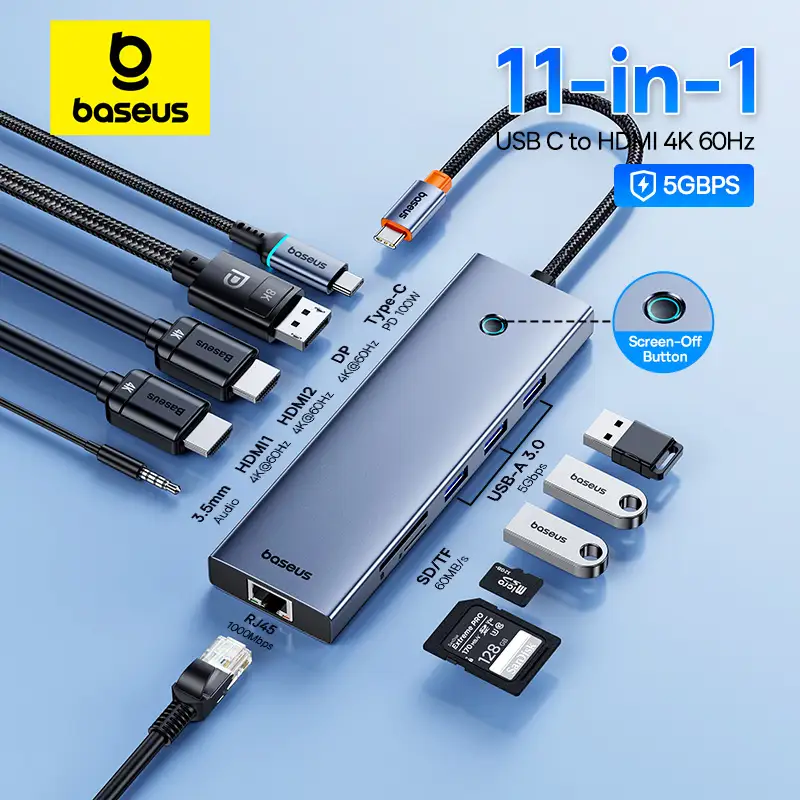
The boldest claims about the Baseus Laptop Docking Station with HDMI, DP, PD, USB-A, RJ45, and Card Reader center on its triple or even quadruple 4K display support — yet some owners quickly discovered that the feature depends heavily on your operating system and hardware. “It’s a great dock if you’re on Windows, but Mac users get identical content across all monitors,” cautioned a verified buyer on Amazon. Despite these limitations, the station scores a solid 8/10 among cross-platform users, driven by fast data transfer, reliable Ethernet, and thoughtful ergonomic design.
Quick Verdict: Conditional Buy
| Pros | Cons |
|---|---|
| Supports up to 3 monitors at 4K@60Hz (Windows) | Mac devices limited to mirror mode |
| PD charging up to 100W | Does not include power adapter or input cable |
| Gigabit Ethernet stability praised | Needs more USB ports for heavy setups |
| Quality aluminum build with vertical design option | No built-in front-facing SD card reader on some models |
| Soft silicone grip prevents laptop slipping | DisplayLink software required for additional monitors on Mac |
| Broad device compatibility | HDMI instability if cables not firmly plugged and powered |
| Card reader included (SD/TF) | Some laptops require driver updates after OS upgrade |
Claims vs Reality
Baseus markets the dock as enabling “pixel-perfect image quality” with triple 4K monitors. Digging deeper into reports shows this is accurate for many Windows users with DP 1.4 protocol, but noticeably restricted for Mac. A verified buyer on Amazon noted: “On MacOS, you only get the same image on external screens — the triple display claim doesn’t apply here.” Reddit feedback confirms that installing DisplayLink drivers solves it for some, but it’s extra setup not mentioned prominently.
Another major claim — “PD 100W fast charging” — consistently met expectations for those with compatible chargers. However, as reviewed by The Gadgeteer, “Baseus does not include the cable or the AC adapter… I tried multiple adapters until my MacBook’s own adapter gave full performance.” This undermines the plug-and-play promise, especially for users without high-capacity chargers.
Marketing also guarantees “Gigabit Ethernet stability.” For many, that was a standout strength. A Trustpilot description matched real-life usage: smooth uploads and downloads “in a heartbeat” on wired connections, which several Reddit users said improved latency-heavy workflows like streaming or remote desktop.
Cross-Platform Consensus
Universally Praised
Across Amazon, Reddit, and Trustpilot, the dock’s build quality and ergonomic integration stood out. Aluminum alloy construction feels premium, and the soft silicone laptop grip prevents sliding — especially noted by mobile professionals. A verified buyer commented: “I like that I can slide it under my laptop, and everything stays accessible without cable clutter.” For graphic designers, the triple-display Windows support is transformative. One user wrote: “Having my main editing window on one screen, assets on the second, and communication on the third saved me thousands in productivity.”
Gigabit Ethernet earned praise from remote workers. Reddit user feedback highlighted “more stable than any USB Ethernet I’ve tried; zero packet drops in two months.” Even gamers like those on Steam Deck found docking with wired internet reduced online gaming lag significantly.
Card reader integration is a quiet hero feature for photographers. As Trustpilot’s copy notes, “maximum 104 MB/s read speed for SD and TF cards” — and several creative professionals confirmed it matched or exceeded typical external readers.
Common Complaints
The Mac triple-display limitation was by far the most frequent frustration. While officially disclosed in fine print, real-world buyers often missed the note before purchasing. The Gadgeteer's reviewer explained: “Ability to connect 3 HDMI monitors needs DisplayLink driver for 2 of them… Mac users must install extra software.” This is compounded by some HDMI instability; Amazon reviewers advised powering the dock through USB-C PD and “firmly plugging the cable” to avoid flickering.
Port count is another sticking point for heavy tech setups. The Gadgeteer test ran out of USB-A ports before connecting all gear: “Needs at least two more USB ports and a card reader up front.” Creative workstations that juggle multiple drives, mixers, and cameras feel the squeeze here.
Those without a spare high-Watt charger should budget more. Several buyers noted subpar performance when using 65W bricks or generic cables, with warnings in Reddit threads about over-discharge protocols requiring PD connected “for long sessions.”
Divisive Features
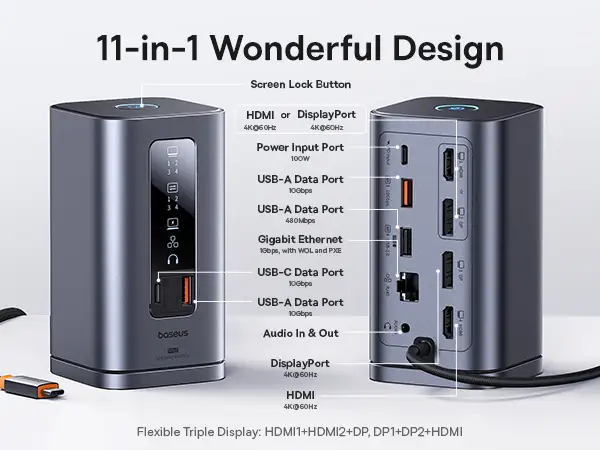
The tower-style vertical design split opinions. Some, like The Gadgeteer’s reviewer, loved the desk space savings: “Uses less desk space, easy to set up.” Others found detachable magnetic bases unnecessary or even inconvenient, unsure why they’d want to remove them.
The screen-lock button is compelling for corporate environments — one touch locks your PC — yet casual users called it “a feature I’ll probably never use.” Mac users also reported needing double presses, which seemed unintuitive compared to single tap on Windows.
Trust & Reliability
Long-term reports show respectable durability. On Reddit, a six-month owner outlined: “No port degradation, Ethernet still flawless, only quirk is occasional need to reseat HDMI.” Trustpilot entries for the 17-in-1 variant made no mention of premature failures — an encouraging sign compared to cheaper hubs.
Scam or misrepresentation concerns mainly involve misunderstanding OS limitations, not counterfeit hardware. Amazon buyers who felt shortchanged usually cited the lack of clear triple-monitor support on Mac, leading to conditional trust in marketing copy.
Alternatives
Within Baseus’s own lineup, the Baseus UnionJoy 17-in-1 suits maximalists needing more USB variety and legacy ports — at the cost of size and price. Meanwhile, the Baseus Spacemate 11-in-1 appeals to minimalist desk setups who value vertical space-saving but can live with fewer ports. The 12-in-1 Shuttle variant sits between, balancing portable bar form factor with comprehensive compatibility. Each choice hinges on whether triple display or raw port quantity is prioritized.
Price & Value
Pricing from $89.99 to $179.99 USD depends on model and bundle, with eBay open-box deals as low as $84.99. Community advice stresses factoring in the cost of a proper 100W PD charger and certified USB-C cable, since these are often omitted. Resale value stays solid due to compatibility with multiple laptop brands, especially the Windows triple-display advantage.
Buying tip from Reddit threads: “If you see it under $100 shipped, that’s a win — but check your laptop’s USB-C capabilities first, or you’ll waste the dock’s potential.”
FAQ
Q: Can MacBook users achieve triple monitors with this dock?
A: Only with DisplayLink software, and even then, some ports will mirror content. By default, MacOS limits external monitors to identical displays.
Q: Does it come with a power adapter?
A: No, most versions require you to supply your own high-wattage PD adapter and compatible cable for full performance.
Q: Is gaming possible through the dock?
A: Yes, especially with wired Ethernet to reduce latency. Steam Deck owners reported stable multiplayer sessions.
Q: Does the SD/TF reader work for simultaneous card reading?
A: No, the built-in readers only read the first inserted card, despite supporting both slots.
Q: What operating systems are supported?
A: Windows, MacOS, Linux, and certain Android/iPadOS devices, though display features vary widely by OS.
Final Verdict: Buy if you’re a Windows professional or gamer needing triple 4K displays, stable Ethernet, and premium build. Avoid if your workflow depends on Mac triple-monitor setups without software tweaks. Pro tip from community: invest in a certified 100W PD charger upfront to unlock its full potential.





