Avery Printable CD Labels Review: Strong Adhesion, Mixed Ease
An Amazon verified buyer summed it up simply: "These labels are working great for me" — and that phrase captures much of the sentiment around Avery Printable CD Labels (Matte White, Permanent Adhesive). With a solid 8.3/10 score drawn from hundreds of reviews across platforms, the product earns praise for professional print quality and ease of use, but repeated complaints about label alignment, thin paper stock, and template software frustrations can't be ignored.
Quick Verdict: Conditional Buy — excellent print and adhesion for those comfortable with template tweaking; potential headaches for Mac users or perfectionists on centering.
| Pros | Cons |
|---|---|
| Strong permanent adhesive holds well without peeling | Thin paper prone to curling |
| Print-to-the-edge full-face coverage for professional look | Templates can be difficult to align |
| Works with both inkjet and laser printers | Mac-specific template/software issues |
| Crisp, smudge-free printing for images and text | Center hole sizing issues with applicators |
| Free Avery Design & Print templates available | Bubbling under labels for some DVDs |
Claims vs Reality
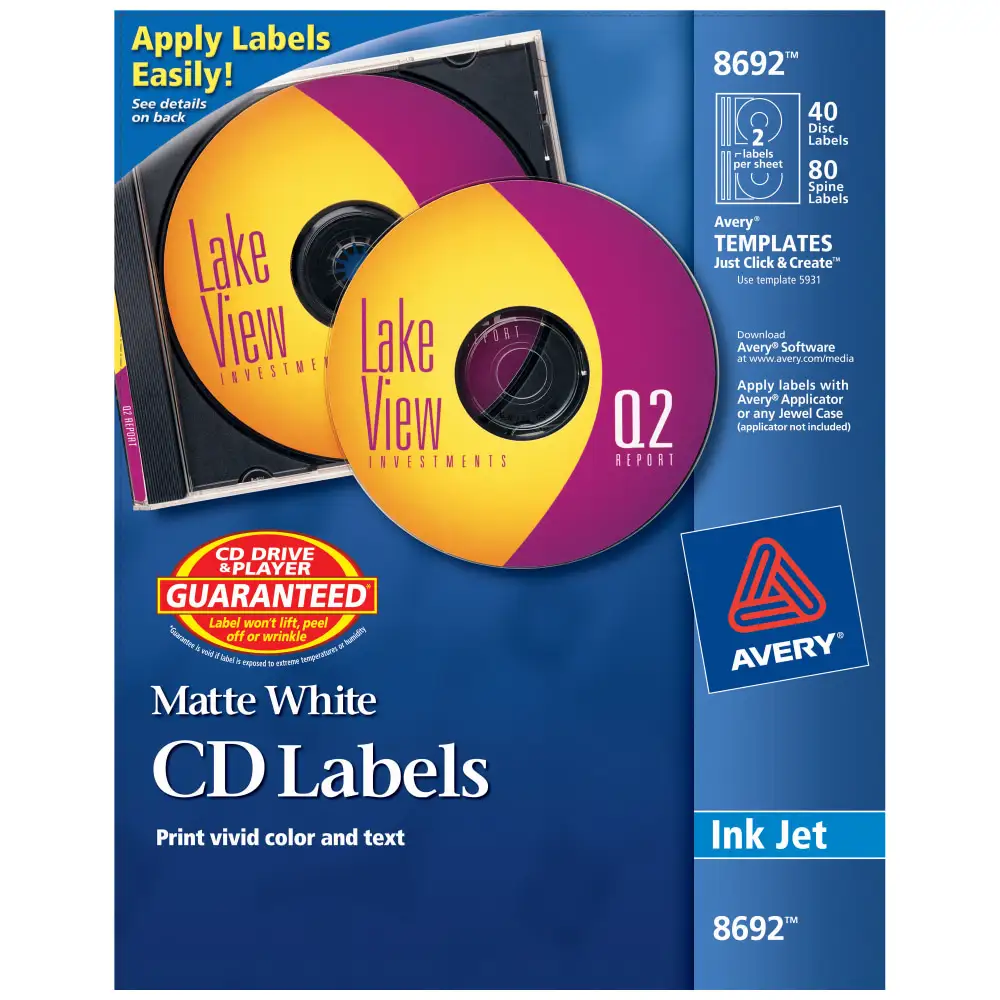
Avery markets these labels as “guaranteed not to lift, peel off or wrinkle” in players or drives, touting a patented centering design and full-face coverage for a professional finish. Digging deeper into user reports, Amazon buyers and Staples customers largely agree on strong adhesive performance. One Trustpilot reviewer said: "These label were easy to type on... when I peeled them off they did not lose their adhesiveness and stayed in place well."
However, the “patented design” for centering isn't foolproof. Staples reviewers repeatedly mention mismatches: "Hole in paper larger than Avery fixter making impossible to get perfect centering on cd or dvd" — a flaw that directly impacts users printing for professional presentations.
Avery also claims templates and online software make customization quick. While some highlight simplicity — "Template works on Macs! Paper holds color very well" from Staples feedback — others outline hours lost to troubleshooting. A Trustpilot report warned: "No Mac based downloadable templates... printing from the site file is a 'system failure'… very frustrating experience." This gap between marketing and user reality means Mac users may need workarounds.
Cross-Platform Consensus
Universally Praised
The standout strength is print quality and adhesion. Reddit feedback is clear: "Colors from our laser... are always right, and we've never had a jam or paper feed mishap." Professional creators benefit from the full-face coverage, which one Staples reviewer noted "helps when you have an image or copy that goes beyond just the outer edge" — ideal for full artwork designs. These attributes extend across inkjet and laser use; Amazon buyers often report success on inkjet despite laser marketing, confirming broad hardware compatibility. Avery’s Design & Print online tool, when functioning smoothly, unlocks rapid prototyping for event discs or promotional media.
Common Complaints
Persistent template alignment problems surface in every platform's reports. Misaligned text and images require manual adjustment: "Still need to align a few things like text size and picture" as one Trustpilot reviewer explained. Paper quality draws criticism too — thin stock curls or tears during removal from the backing, especially in the 8691 thin matte variant: "Hard to remove from the backing without tearing the labels."
Hardware compatibility isn't entirely issue-free; Staples buyers found bubbled surfaces after application: "Bubbles starting to form underneath the label... totally worthless to me." Others noted smearing from laser-printed toner when applying before adequate drying.
Divisive Features
Full-face labels themselves split opinion. While many appreciate full-bleed designs filling the disc, a subset prefers smaller, simpler designs due to complexity in centering. Avery’s free software divides users too. Some gush over simplicity — "It's as easy as 123" — while others avoid it entirely, opting for custom designs in Word or Photoshop. The patented centering mechanism also triggers debate: professionals demand perfect symmetry while casual users accept minor variance.
Trust & Reliability
Trustpilot data shows Avery enjoys a 9.49/10 trust score with overwhelmingly positive sentiment for CD label products. Long-term users on Reddit stress consistent cut quality over “hundreds of labels” without jams or peel failures, essential for bulk production environments. One veteran noted: "I've used Avery products for years - always with consistent results... you might pay a few pennies more, but the quality is worth it."
At the same time, software reliability concerns are more acute. A detailed Amazon review described hours cleaning leftover registry entries after a faulty install, warning technically inexperienced users about possible side effects. Despite isolated software issues, there are no scams or counterfeit worries reported — purchases through major retailers and Avery direct seem safe.
Alternatives
Staples’ own CD/DVD label kit garners occasional preference from users who found Avery’s bubbling or hole sizing problematic: "Don't work as good as Staples... Staples product are the best." Memorex labels also appear as an alternative in Amazon reviews, chosen by a buyer troubleshooting print settings. Yet for those requiring permanent adhesive and full-face print-to-the-edge capability, Avery remains the most cited “go-to” despite flaws.
Price & Value
Current Amazon listings show the 40-disc label pack at $19.28, down from $25.53, averaging about $0.48 per label. Compared to local store buys — "Bought 100 from Staples for more than 250 on Amazon" — online bulk purchases provide clear savings. Ebay listings for smaller packs hover around $9–$10, but volume buyers find direct-from-Amazon bulk more economical. Community tips emphasize checking printer settings to “labels” or “heavy paper” modes to prevent failed prints, maximizing each label’s value.
FAQ
Q: Do these labels work with both inkjet and laser printers?
A: Yes. While some models are marketed for laser, many users successfully print with inkjet. Always confirm your printer’s media settings for best results.
Q: How well do they adhere over time?
A: Strong permanent adhesive holds up well; multiple long-term users report no peeling even after frequent playback in players.
Q: Are the templates easy to use on Mac?
A: Experiences vary. Some report smooth use via Avery’s online tool, while others encounter system failures or lack of downloadable Mac versions.
Q: Can I avoid bubbling when applying labels?
A: Ensure the disc surface is clean and toner-based prints are fully dry before application; set printer to “labels” or “heavy paper” mode for optimal adhesion.
Q: Is the full-face coverage worth it?
A: For detailed or edge-to-edge artwork, yes. Casual designs may be easier with smaller labels to reduce centering challenges.
Final Verdict: Buy if you need high-quality, professional-looking full-face CD labels and are comfortable with template alignment or using your own design software. Avoid if you demand perfect centering via applicator or rely entirely on Avery’s Mac software. Pro tip from community: Adjust printer settings before printing and peel labels slowly to prevent curling.





