Avery Easy Peel Address Labels 5161 Review: 9/10 Buy?
“Nothing to dislike. Works as it should.” That blunt satisfaction, echoed across dozens of ratings, captures why Avery Easy Peel Address Labels 5161 sits near the top of address‑label staples. Overall verdict from the provided data: these labels are widely trusted for bulk mailings and organization, with one notable caveat around template alignment for some users. Score based on cross‑platform ratings and review tone: 9/10.
Quick Verdict
Yes — for most laser (and some inkjet) mail‑merge and shipping workflows, with a small risk of alignment headaches depending on printer/software setup.
| What users like | Evidence | What users don’t like | Evidence |
|---|---|---|---|
| Clean printing and strong stick | A verified buyer on Amazon noted: “so nice to print and stick… print well & stay stuck.” | Occasional misalignment in templates | A verified buyer on Amazon complained: “I wasted 9 sheets… kept printing over on the next label.” |
| Easy peel / fast application | A verified buyer on Amazon said: “they peel off easily from the backing sheet.” | Manual adjustment sometimes needed | Same Amazon buyer: “ended up adjusting them manually… looked terrible, but printed well enough.” |
| Fits long addresses well | A verified buyer on Amazon wrote: “good for long addresses… rarely a need to edit down.” | Not everyone will repurchase | That buyer concluded: “I likely will not purchase this particular label again.” |
| High satisfaction overall | Amazon average 4.8–4.9; Office Depot 4.8; Staples 4.7 | — | — |
Claims vs Reality
Marketing claim #1: Sure Feed technology prevents jams and misalignments. Digging deeper into user reports, most buyers don’t explicitly mention jams — which in itself suggests the feed reliability is at least “invisible” in day‑to‑day use. The dominant tone is routine competence. A verified buyer on Amazon summed that up with: “works as advertised… pleased with purchase so I’d purchase again.” Another was even shorter: “nothing to dislike. works as it should.”
But the “misalignment” part of the claim is where reality complicates the story. One Amazon reviewer, who described years of label‑printing experience, reported a clear mismatch between templates and output: “I wasted 9 sheets because they kept printing over on the next label… same results” on multiple printers. While Avery positions Sure Feed as reducing misalignment, at least one experienced user found alignment problems severe enough to stop future purchases.
Marketing claim #2: Smudge‑free, crisp printing optimized for laser. Many users validate this, even when using inkjets. A verified buyer on Amazon said: “print well & stay stuck,” focusing on output quality and adhesion together. Another detailed ink behavior: “the ink is always dry upon exiting the printer and never smears from your touch,” even when running the same sheet multiple times. This suggests the stock handles toner and some inkjet applications cleanly in real workflows.
Still, the evidence base here is mostly positive experience rather than stress‑test complaints, so the claim stands without much contradiction. The only indirect caveat is that print quality depends on alignment; if labels shift, even sharp print ends up in the wrong place.
Marketing claim #3: Easy Peel pop‑up edge speeds application. User feedback aligns tightly with that pitch. Multiple Amazon buyers highlight peeling ease: “they peel off easily from the backing sheet,” and “the labels are fine — the peel easily and stick well.” Even the reviewer who struggled with printing accuracy still confirmed peel performance, separating the physical label design from the software/printer experience.
Cross‑Platform Consensus
Universally Praised
The first recurring pattern is dependable adhesion for high‑volume mailings. Across Amazon’s 4.8–4.9 star averages and Office Depot’s 4.8 rating, users repeatedly frame these as the default solution for routine addressing. For office administrators or anyone running recurring mailers, the value is in predictability. A verified buyer on Amazon wrote: “only labels I use for mailings… these are the only ones I use for work.” Another reinforced that they “adhere excellently,” pairing durability with price.
A second widely praised strength is peel‑and‑apply speed. The Easy Peel pop‑up edge seems to remove friction from bulk tasks. For holiday card senders or small‑business shippers labeling dozens of envelopes at a time, the physical convenience matters as much as print output. A verified buyer on Amazon said: “they peel off easily from the backing sheet.” Another long‑time seasonal user framed it as tradition: “great for christmas mailing… love the convenience and quality.” The repetition of “convenience” suggests the peel design delivers time savings users actually feel.
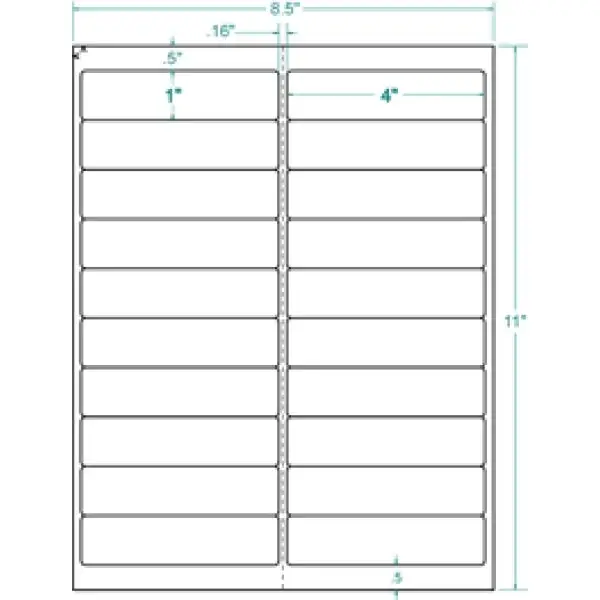
Third, users emphasize the 1" x 4" format as unusually forgiving for long addresses and mail merges. People pulling data from spreadsheets or databases often fight truncation on smaller 30‑up sheets. Here, the extra length pays off. A verified buyer on Amazon explained that with Excel + Word mail merge, “I’m able to handle content of almost any length — long names, long or complicated street addresses… rarely a need to edit down.” For community organizers, HOA managers, or international mailers, that “rarely a need to edit down” is a workflow win, not just a size spec.
Finally, print clarity gets validated through everyday stories rather than lab talk. One Amazon reviewer called them “so nice to print and stick,” while another described running sheets multiple times without smearing: “ink is always dry upon exiting… never smears from your touch.” For users who re‑feed sheets to add return addresses or corrections, that resistance to smudge becomes practical trust.
Common Complaints
The standout complaint is template alignment issues in certain setups. This isn’t widespread enough to dent the overall average, but it is detailed and intense. A verified buyer on Amazon recounted wasting “9 sheets” because labels “kept printing over on the next label,” even when templates appeared centered. They tested both a Samsung laser and HP inkjet with “same results,” eventually resorting to manual offsetting. For users running one‑off bulk mail jobs, that kind of troubleshooting can erase the convenience advantage.
What’s notable is that the complaint targets printing workflow rather than label material. Even the frustrated reviewer acknowledged: “the labels are fine — the peel easily and stick well.” So the risk seems to fall on printer tolerances, driver settings, or template presets rather than adhesive or paper quality. Still, the impact is real: they finished by saying, “I likely will not purchase this particular label again.” For buyers without patience for calibration, that’s the key red flag in the dataset.
No other consistent negative theme appears in the provided reviews. There are no repeated mentions of poor stick, tearing, or smudging. The silence on those fronts — paired with the high rating density — indicates that most problems users encounter are upstream in printing alignment, not in the label itself.
Divisive Features
Printer compatibility is the mildly divisive area. Officially, 5161 is optimized for laser printers, and most users appear to be on laser workflows. Yet at least one buyer used an inkjet successfully: “I print… using an HP Officejet Pro 8500 (inkjet)… work terrific,” praising dry‑out speed and re‑feeding resilience. Meanwhile, the misalignment complaint spanned both laser and inkjet printers, suggesting that “works on inkjet” can be true for some and frustrating for others.
So the divisive takeaway: the labels themselves don’t seem picky, but the printing ecosystem around them can be.
Trust & Reliability
The Trustpilot and Reddit data in the table are effectively product‑spec repeats without distinct user narratives, so trust signals come primarily from verified retail reviews and cross‑store rating stability. The consistency is striking: Amazon sits at 4.8–4.9 stars, Office Depot at 4.8, Staples at 4.7. That alignment across independent retailers suggests low manipulation risk and a stable reputation built on repeat purchasing.
Long‑term durability stories are sparse in the provided data, but users do describe sustained use over years. A verified buyer on Amazon shared: “I have been using avery labels for my christmas card list for many years now,” implying the product performs reliably season after season. Another said these are “the only ones I use for work,” which reads like institutional trust rather than a one‑off trial.
Alternatives
Competitors in the data are primarily other Avery lines (like 8461 for inkjet) and generic “basic labels” mentioned indirectly in descriptions, not in user quotes. Because no users explicitly compare to non‑Avery brands here, the only real alternative framing comes from the long‑address reviewer. They contrasted 5161 to smaller Avery formats: “smaller avery labels (30 up)… may look more economical, but typically require considerable editing.” For users choosing between Avery sizes, the 5161’s longer rectangle is positioned by buyers as the practical option for complex addresses.
No other competitor narratives are present, so cross‑brand comparisons can’t be responsibly expanded beyond that.

Price & Value
Prices vary by retailer in the provided sources, ranging roughly from about $29–$53 per 2,000‑label box depending on store and sale status (Amazon and OfficeSupply listing lower, Office Depot higher). Users on Amazon explicitly praise deal value. One verified buyer wrote: “great buy… I will not find a greater or better deal than amazon.” Another called pricing “good,” tying it to fast delivery and durability.
Value also shows up through waste reduction. Most users don’t report wasted sheets; the lone exception wasted nine, which would meaningfully reduce value for that edge case. For bulk mailers who print correctly the first time, the combination of “print well & stay stuck” and easy peeling makes the cost per label feel justified.
Community‑style buying tips in the data are light, but the mail‑merge user story implies a best practice: use the 5161 template in Word/Excel mail merge when handling long addresses to avoid manual edits.
FAQ
Q: Do these labels actually peel easily without tearing?
A: Yes, most verified buyers describe smooth peeling. One Amazon reviewer said they “peel off easily from the backing sheet,” and even a dissatisfied printer‑alignment buyer agreed “the labels are fine — the peel easily and stick well.”
Q: Are Avery 5161 labels good for long or international addresses?
A: Users strongly support this. A verified buyer on Amazon wrote that 1" x 4" labels handle “content of almost any length… lengthy international addressing” with “rarely a need to edit down.”
Q: Will they print cleanly without smudging?
A: Most users say yes. An Amazon buyer noted the labels “print well & stay stuck,” and another reported ink was “always dry upon exiting… never smears,” even after re‑feeding sheets.
Q: Do the templates line up correctly in Word/Avery Wizard?
A: Usually, but not always. One experienced Amazon buyer said they “wasted 9 sheets” because printing shifted into the next label, requiring manual adjustment. Others reported no alignment issues.
Q: Can I use them in an inkjet printer even though they’re laser‑optimized?
A: Some users do successfully. One Amazon reviewer used an HP inkjet and said the labels “work terrific.” But another saw misalignment on both laser and inkjet, so results may depend on printer settings.
Final Verdict
Buy if you’re a small business shipper, office admin, or holiday‑card sender who wants a reliable 1" x 4" mail‑merge label that “print[s] well & stay[s] stuck” and peels fast. Avoid if your workflow is sensitive to perfect template alignment and you don’t want to troubleshoot — one buyer’s “wasted 9 sheets” experience is the clearest caution. Pro tip from the community: if you print long names or international addresses, the extra length means “rarely a need to edit down,” saving time over smaller 30‑up formats.





