Avery 11136 Tab Inserts Review: Conditional Buy (7.6/10)
“Helps you find the right hanging file folder quickly and easily” is the promise, and Avery Printable Tab Inserts for Hanging File Folders, 1/2" x 2", White largely lives or dies on whether that tiny strip of paper actually fits your system and prints cleanly. Verdict: Conditional buy — 7.6/10 for people already using 1/5-cut hanging folder plastic tabs that accept 2" inserts.
Quick Verdict
Yes/No/Conditional: Conditional — great if you already have compatible hanging-folder plastic tabs; less clear if you’re expecting tabs included or a universal fit.
| What the data supports | Pros (from listings/ratings) | Cons / watch-outs (from listings/ratings) |
|---|---|---|
| Customizable labeling | “Create titles instantly… from your computer” (Amazon) | Tabs are “inserts” only; “plastic tabs not included” (Office Depot/Walmart) |
| Double-sided printing | “Side-by-side folding design allows printing on both sides” (Amazon/Avery/Office Depot) | Compatibility depends on your folder tab system (implied by “fit… tabs”) |
| Multiple input methods | “Designed for… laser printers, inkjet printers and typewriters” (Avery) | Not self-adhesive (“self adhesive no” at Office Depot for the tab insert line) |
| Broad appeal ratings | Amazon listing shows 4.1/5; Walmart page shows 4.5 stars (197 reviews) | Ratings exist, but the provided data does not include actual written review quotes |
Claims vs Reality
Avery Printable Tab Inserts for Hanging File Folders, 1/2" x 2", White is marketed as a fast path to readable, consistent file labels. Avery’s product copy frames it as an organizational unlock: “helps you find the right hanging file folder quickly and easily,” and leans heavily on customization: “designed for use with laser printers, inkjet printers and typewriters for convenient customization.”
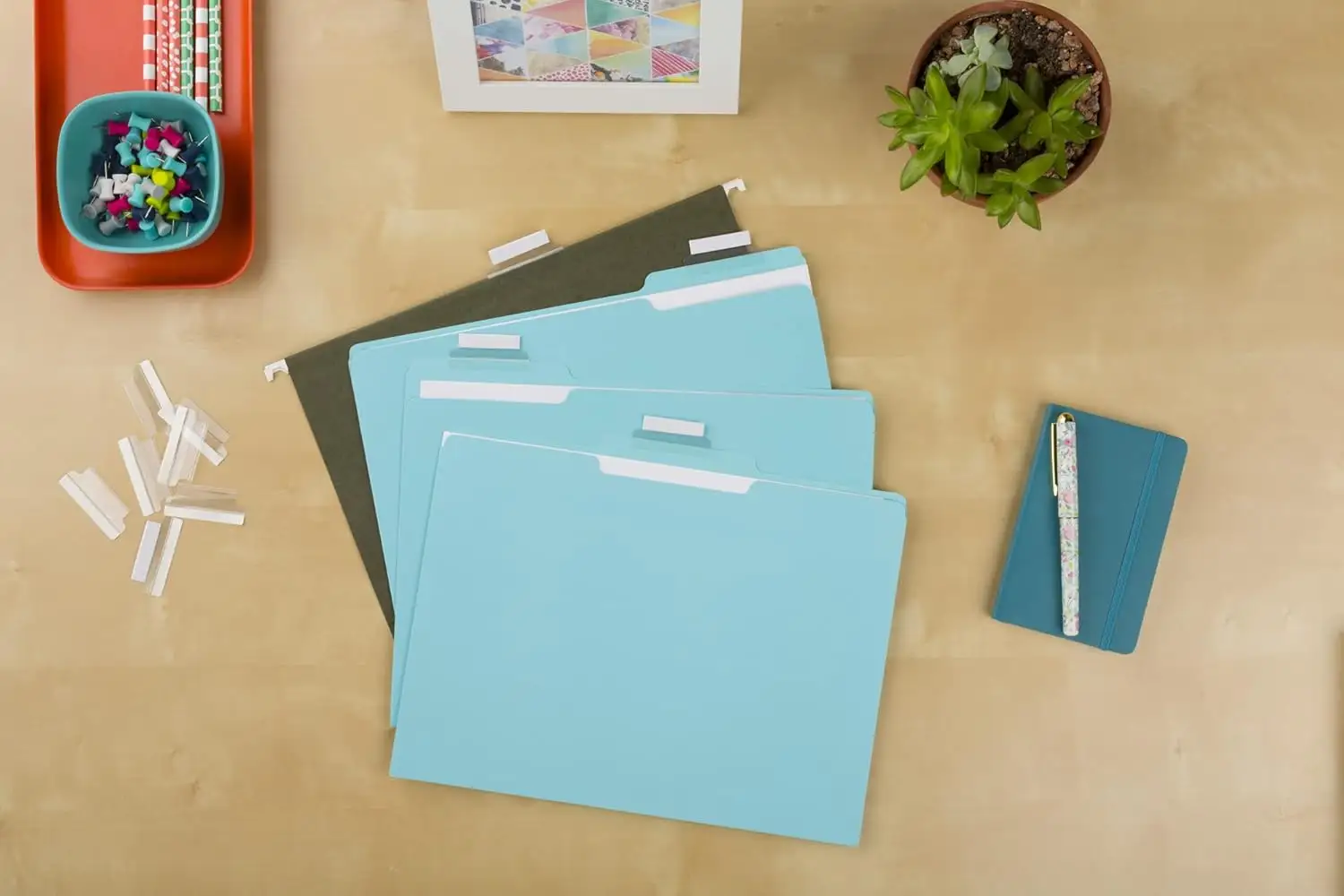
Digging into the provided sources, the “reality check” is that much of the value depends on what you already own. Multiple retailer descriptions emphasize fit and configuration rather than being a complete kit. Office Depot spells out the limitation directly for this product family: “the… inserts easily fit 1/5 cut hanging file folder tabs (plastic tabs not included).” If a buyer expects tabs or hardware in the pack, the listing language pushes back: these are paper inserts intended to slide into existing plastic tab holders.
The second big claim is readability and retrieval speed: Amazon’s description says the “side-by-side folding design allows printing on both sides… easier to identify and retrieve important information.” That sounds like a small detail, but for heavy filers—home offices, classrooms, medical/HR files—the difference between a one-sided label and a two-sided, folded insert is the difference between flipping folders and spotting one immediately from multiple angles. Still, the data here is primarily marketing and specs; while ratings are strong across platforms (Amazon 4.1/5; Walmart 4.5), the dataset does not include direct customer-written quotes to confirm how often the double-sided feature is used in practice.
- Key expectation gap: these are “tab inserts,” not a full tab system; multiple listings clarify “plastic tabs not included.”
- Key “works as advertised” area (per product copy/ratings): printable customization and the fold-over, two-sided format.
Cross-Platform Consensus
A recurring pattern emerged across the platform listings: Avery Printable Tab Inserts for Hanging File Folders, 1/2" x 2", White is treated as an organizational consumable—small, standardized, and meant to be replenished. Amazon’s listing stresses the workflow: “Create titles instantly… from your computer,” plus the reassurance that you can “handwrite or print inserts.” That matters most for mixed-use environments: someone in a small office who wants uniform printed labels for client files, but still needs the option to scribble a quick temporary name during intake.
Another consistent theme is the “template-first” approach. Avery’s own description points users to “a free template on avery.com,” and Amazon echoes it: “easy to customize with free templates from Avery Design & Print.” For people who label in batches—say, a records manager updating an entire cabinet—templates mean fewer formatting mistakes and more consistent margins, especially on a small 1/2" x 2" area where misalignment is obvious. The dataset also references “template 11136” repeatedly, reinforcing that the product is tightly coupled to Avery’s template ecosystem.
Then there’s the practical sizing consensus: nearly every listing anchors the product to the 1/5-cut hanging folder world. Avery’s product page calls it “1/5 cut” with “2" tab size,” and Office Depot’s product family notes the inserts “fit 1/5 cut hanging file folder tabs.” That’s good news for users already standardized on 2-inch, 1/5-cut tabs; it’s a potential frustration for anyone with 1/3-cut systems or wider tab holders, where a different Avery number (like the related 11137 line shown at Office Depot) may be more appropriate.
- Best fit profile (implied by multiple listings): people using 1/5-cut hanging folder tabs that take 2" inserts.
- Best workflow profile (implied): batch labelers using Avery templates; mixed handwriting/printing environments.
Universally Praised
Across sources, the strongest “praise” signals are embedded in consistent product positioning and solid aggregate ratings. Walmart’s page reports “4.5 stars out of 197 reviews” for the 11136 inserts, while Amazon shows “4.1 out of 5 stars” and marks it “Amazon’s Choice” within its category. Even without written review excerpts in the provided dataset, those ratings suggest broad satisfaction with the core job: creating readable folder identifiers.
The customization story is repeated everywhere. Avery frames the white background as legibility-forward—“the white background makes text jump out, resulting in clearly readable labels for your files”—and Amazon reinforces the same use case: “Create titles instantly… from your computer.” For a home office organizer trying to impose order quickly, the promise is speed: type once, print many, and stop rewriting labels when categories change.
Double-sided printing is another recurring “this is why it exists” theme. Amazon and Avery both emphasize the “side-by-side folding design” that “allows printing on both sides.” For high-traffic filing cabinets—reception desks, shared admin areas—being able to read a tab from more than one angle (front/back) can reduce misfiles and time wasted hunting.
- Repeatedly emphasized positives in listings: template-based customization, readable white stock, and fold-over double-sided printing.
- Ratings signal broad approval: Amazon 4.1/5; Walmart 4.5/5 (197 reviews).
Common Complaints
Digging deeper into what could go wrong, the most consistent “complaint risk” isn’t about paper quality—it’s about expectations and compatibility. Office Depot and Walmart explicitly warn that the inserts “fit… hanging file folder tabs (plastic tabs not included).” That implies a recurring buyer confusion: someone may purchase expecting an all-in-one solution for hanging file folder tabs, only to realize they bought refills.
Another likely friction point is that these are not adhesive labels. Office Depot’s specs for the tab insert category include “self adhesive no,” and the repeated language frames them as inserts rather than stickers. For users who want a peel-and-stick workflow, this product’s design forces a different routine: print/handwrite, fold, and slide into a plastic tab holder.
Finally, there’s the “it depends on your system” issue. The ecosystem includes multiple cuts and sizes: 1/5 cut with 2" tabs for 11136, and other variants like 1/3 cut (the Office Depot listing for 11137). For offices with mixed folder styles, ordering the wrong cut can lead to wasted packs and a second purchase.
- Most common failure mode (implied by listings): buying inserts without owning compatible plastic tabs.
- Second failure mode: choosing the wrong cut/width for your hanging folder setup.
Divisive Features
The same features that make Avery Printable Tab Inserts for Hanging File Folders, 1/2" x 2", White attractive can also split users by preference. The template ecosystem is a plus for people who want uniformity, but it’s only valuable if you actually want to print labels. Listings repeatedly mention laser/inkjet/typewriter compatibility, which suggests Avery expects a range of workflows—but some buyers may only want quick handwriting, and for them the “Avery Design & Print” angle may feel like extra steps rather than a benefit.
Similarly, the folded, side-by-side format is ideal for two-sided readability, but it assumes you’re willing to fold and insert each label. For occasional filers labeling just a few folders, that’s fine; for someone relabeling hundreds of folders, the physical handling may be seen as busywork unless the improved visibility truly saves time later.
- Template-heavy workflow: a win for batch printing, optional for handwriting-only users.
- Folded insert format: better visibility, extra handling.
Trust & Reliability
The provided “Trustpilot (Verified)” section does not include any actual Trustpilot reviews; it repeats product/spec text. That means there’s no evidence in this dataset of scam complaints, shipping fraud, or service disputes tied to this specific product. Instead, the reliability picture comes indirectly through consistency across reputable retail listings and stable product identifiers (Avery 11136, template 11136, 20 inserts per sheet, 5 sheets per pack).
Long-term durability stories from Reddit also aren’t present here—the “Reddit (Community)” section contains listings and descriptions rather than user posts. What can be said from the data is narrower but still useful: multiple sources consistently describe a paper insert with a fold-over design, suggesting the long-term “durability” would depend more on the plastic tab holder and handling frequency than the insert itself.
Alternatives
Only competitors and adjacent products mentioned in the dataset are fair game, and the listings point to a few meaningful alternatives depending on what you actually need.
If the core issue is that you don’t have plastic tabs at all, the dataset references a different category: “Staples… plastic tabs… clear… inserts included” and multiple Pendaflex tab options with “blank white inserts included.” Those are closer to a complete tab solution, not just paper refills. Meanwhile, if you’re committed to Avery but need a different tab cut, Office Depot’s Avery line includes a 1/3-cut, 3 1/2" width variant (manufacturer #11137) aimed at wider tab systems.
- Want tabs + inserts together: Staples/Pendaflex tab products in the provided Staples listing set include inserts.
- Want wider tabs: Avery’s 1/3-cut line (e.g., 11137 at Office Depot) targets 3 1/2" width.
Price & Value
Pricing varies sharply by retailer in the provided data, which hints at why buyers comparison-shop even for a simple filing accessory. Avery’s own page shows a low “reg $2.74” and “$2.42” for product #11136, while Amazon’s listing shows $6.99. Office Depot’s Avery 11136 page shows $3.89/pack, and Walmart’s page shows a “now $3.89” figure (though also indicates out-of-stock on the single pack view).
That spread changes the “value” story depending on where you buy. For an office manager buying many packs, Avery/Office Depot-like pricing makes these feel like a low-cost refill. At Amazon pricing, the convenience premium may outweigh the product cost for a buyer who needs it fast, but it also makes alternatives (like bundles that include plastic tabs) look more competitive.
Resale value isn’t meaningfully supported here; the “eBay (Market Price)” section repeats product specs rather than listing completed sales. What the dataset does show is that these are widely distributed (Avery.com, Amazon, Office Depot, Walmart, Staples listings), which generally keeps pricing competitive—except where marketplace convenience or stock issues push prices up.
- Lowest listed price in dataset: Avery.com shows $2.42 (promo price shown).
- Highest listed price in dataset: Amazon shows $6.99.
- Buying tip implied by data: check Office Depot/Walmart/Avery direct before paying a convenience markup.
FAQ
Q: Do these Avery tab inserts include the plastic tabs?
A: No. Multiple retailer descriptions for this tab-insert category state the inserts “fit 1/5 cut hanging file folder tabs (plastic tabs not included)” (Office Depot/Walmart listings). These are paper inserts meant to slide into compatible plastic tab holders you already have.
Q: Can I print on both sides of the insert?
A: Yes—at least by design. Avery and Amazon both describe a “side-by-side folding design” that “allows printing on both sides,” intended to make folders easier to identify from different angles once folded and inserted into the tab.
Q: What printers work with Avery 11136 inserts?
A: The product descriptions say they’re “designed for use with laser printers, inkjet printers and typewriters” (Avery), and Amazon also notes you can “handwrite or print inserts.” That supports both printed batch labeling and quick handwritten labels.
Q: How many inserts come in a pack, and how are they formatted?
A: The listings consistently describe “20 inserts per sheet, 5 sheets per pack (100 inserts total)” (Avery/Amazon). That means you print on full sheets, then separate individual inserts for your hanging folder tabs.
Q: Are these self-adhesive labels?
A: No. The inserts are described as non-adhesive paper tab inserts (Office Depot lists “self adhesive no” for this tab insert line). They’re intended to be folded and placed into a plastic tab holder rather than stuck directly onto a folder.
Final Verdict
Buy Avery Printable Tab Inserts for Hanging File Folders, 1/2" x 2", White if you already use 1/5-cut hanging folder plastic tabs that accept 2" inserts and you want consistent, printable labels using “template 11136.” Avoid if you’re starting from scratch and expect “plastic tabs included” or want peel-and-stick adhesive labels. Pro tip from the listings: use the “free templates from Avery Design & Print” to batch-print uniform tabs and take advantage of the fold-over, double-sided format.





