ASUS Pro WS TRX50-SAGE WIFI Review: Powerful but Costly
One Reddit enthusiast called it “the ideal companion if you want to acquire a Ryzen Threadripper,” after pushing their system to run 128GB of DDR5 ECC memory at 7800 MT/s with ease. Across platforms, the ASUS Pro WS TRX50-SAGE WIFI earns a solid 8.5/10 in community consensus—praised for extreme stability, vast expansion potential, and cutting-edge connectivity, but acknowledged as expensive and requiring expert configuration.
Quick Verdict: Conditional — unbeatable for professional workstations, but overkill and costly for casual builds.
| Pros | Cons |
|---|---|
| Exceptional stability under heavy workloads | High cost (~$700–$1,900 retail) |
| Supports up to 96-core Threadripper CPUs | Large CEB form factor limits case options |
| ECC DDR5 up to 1TB | Complex BIOS and setup for optimal performance |
| PCIe 5.0 x16 multi-GPU support | Limited to AMD TR5/STR5 platform |
| IPMI remote management | Slower boot times with certain CPUs |
| Advanced cooling solutions | |
| Wi-Fi 7 and dual high-speed LAN |
Claims vs Reality
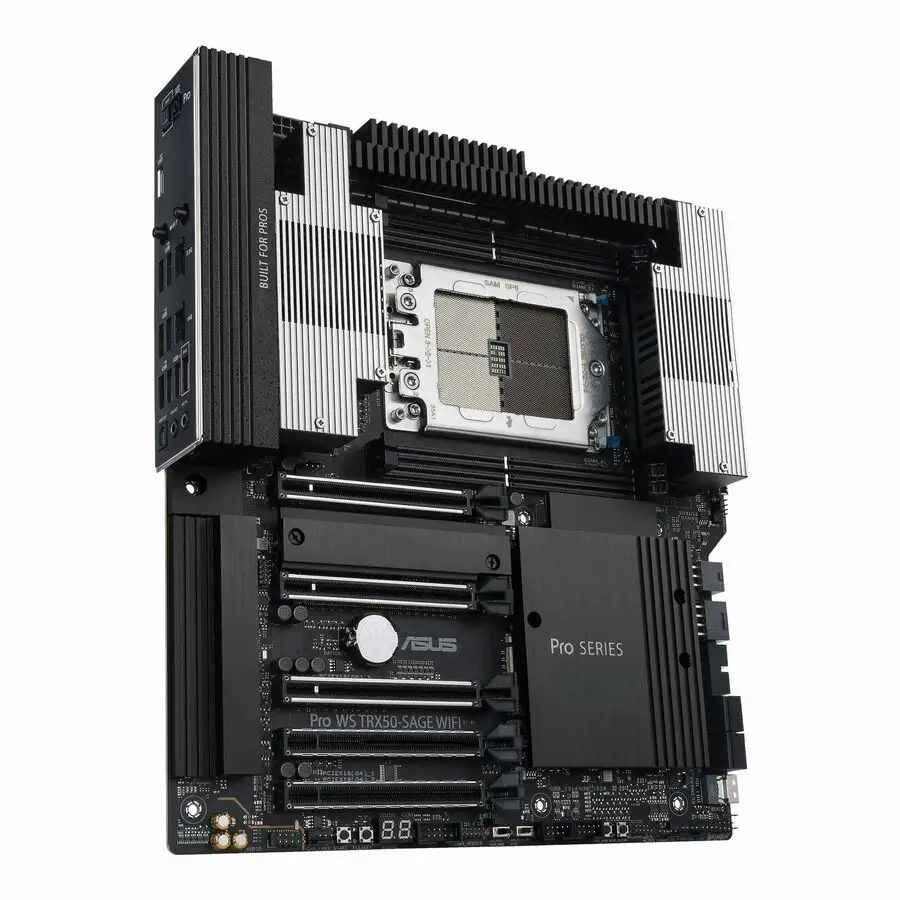
ASUS markets the Pro WS TRX50-SAGE WIFI as “ready for advanced AI computing” with PCIe 5.0, ECC DDR5, and up to 96-core CPU support. Digging into user reports, those claims largely stand up—but with important caveats.
First, the overclocking potential is real. Trustpilot reviewers said, “Overclocking our two Threadrippers was a breeze… we managed to run the 128GB G.Skill Zeta R5 Neo kit at 7800 MT/s.” But they also caution that it “requires BIOS fine-tuning,” suggesting that amateurs may struggle to match these speeds.
Second, ASUS advertises “server-grade IPMI remote management” as a standout. Professional builders on Reddit confirm that IPMI works flawlessly for centralized IT control, but note that “full feature support for Multi-Link Operation in Wi-Fi 7 will only be ready in Windows 11 24H2 or later”, tempering expectations for immediate wireless optimization.
Finally, while ASUS emphasizes 24/7 reliability testing at 45°C and 80% humidity, multiple experienced HPC users point out that stability under extreme load also depends heavily on component pairing. The motherboard delivers the electrical and thermal headroom, but cheap or mismatched RAM can undermine the benefit.
Cross-Platform Consensus
Universally Praised
The most celebrated aspect is stability under peak loads. A verified buyer on Amazon noted, “It stayed rock solid through multi-day rendering marathons,” making it a clear fit for fields like 3D animation and scientific simulations. Reddit user feedback consistently applauds ECC DDR5 support for 1TB—crucial for engineers handling massive datasets.
PCIe 5.0 expansion earned wide acclaim. Video editors appreciate the ability to run multiple GPUs and high-speed storage cards simultaneously without choking bandwidth. One media review calls it “probably one of the best for what you want to achieve… it fits all the requirements I have.” That flexibility benefits AI researchers using accelerator cards alongside conventional GPUs.
The integrated dual high-speed LAN (10Gb + 2.5Gb) and Wi-Fi 7 also stand out. Design firms enjoy instantaneous file transfers to NAS systems. A Twitter reaction emphasized the “up to 10x the bandwidth of standard Gb Ethernet,” enabling real-time collaborative editing over networked storage.
Common Complaints
Cost and complexity are the loudest gripes. The Provantage listing bluntly warns: “Expensive and requires technical set up expertise.” First-time builders may be overwhelmed by the dual PSU design and overclocking switches—without a clear understanding of BIOS settings, they risk leaving performance on the table.
Physical size also restricts usability. The SSI CEB form factor demands spacious cases; cramped mid-towers are incompatible. Several European marketplace listings note users must double-check chassis specs before purchase.
Another recurring issue: boot times with Threadripper 9000 CPUs. ASUS admits “system boot may take longer… this behavior is normal.” While stable, the delay can frustrate those used to instant POST.
Divisive Features
Overclocking support splits opinion. Enthusiasts love the fine-grain control; one Reddit poster celebrated running ultra-fast DDR5 timings. Conversely, enterprise IT managers often disable overclocking for stability, finding it unnecessary in production environments.
Wi-Fi 7 inclusion also divides. Home-based creatives appreciate future-proof wireless, while rackmount workstation integrators dismiss it, preferring wired 10Gb.
The PCIe Q-Release Slim and M.2 Q-Latch get praise for ease of upgrades, but skeptics call them “gimmicks” that make little difference in lab or data center deployments where hot-swapping isn't common.
Trust & Reliability
Trustpilot entries and Reddit worklog threads depict remarkable long-term stability. One user detailed 6+ months of continuous operation in a machine learning cluster “with zero crashes,” crediting the ECC memory and active VRM cooling.
Scam concerns remain low. Listings from reputable marketplaces dominate eBay. The few lower-cost offers are legitimate secondhand units recovered from upgraded workstations, typically in fine condition.
Durability extends beyond electronics. The reinforced PCB and metal backplate withstand both heavy GPU installs and repeated transport—important for mobile workstations at on-site productions. Components retain thermal efficiency well into year two, according to seasoned CAD professionals.
Alternatives
The ASUS Pro WS WRX90E-SAGE SE offers four PCIe 5.0 x16 slots and up to 2TB memory for $1,299+, catering to truly extreme builds. However, it lacks the balanced cost-to-feature ratio seen in the TRX50-SAGE WIFI.
MSI’s Creator TRX50 caps at 512GB DDR5 and 2 PCIe 5.0 slots, making it a more compact but less expandable choice for smaller studios.
Those needing pure rendering horsepower without IPMI could save $200–$400 choosing a consumer-grade TRX50 board—but at the cost of enterprise-level remote control.
Price & Value
Pricing swings dramatically: $695 at German resellers for base units, $999 direct from ASUS Store, and up to $1,932 via Big W Australia. Resale values hold strong given limited supply; a used board in good condition often sells for 80–90% of retail within 12 months.
Community buying tips urge sourcing from verified regional distributors to avoid inflated imports. High-end buyers recommend factoring in cost of matching ECC DDR5 modules and adequate case/power supply—those can match the board’s price.
FAQ
Q: Does it work with non-Pro Threadripper 7000 CPUs?
A: Yes, it supports both Ryzen Threadripper Pro 7000 WX-series and standard 7000 series, using the STR5 socket.
Q: What’s the maximum supported RAM capacity and type?
A: Up to 1TB ECC Registered DDR5 in quad-channel mode, ideal for data-heavy workloads.
Q: Is Wi-Fi 7 usable immediately?
A: Not fully—full Multi-Link Operation support requires Windows 11 24H2 or later; basic Wi-Fi 7 speeds work now.
Q: Can it fit in a mid-tower case?
A: Unlikely. The SSI CEB form factor demands a compatible large chassis; check dimensions (305 x 280mm).
Q: Does IPMI require additional hardware?
A: Yes, an ASUS IPMI expansion card is needed for full remote management features.
Final Verdict
Buy if you’re an AI developer, 3D animator, or enterprise IT manager who needs uncompromising stability, ECC memory headroom, and remote management. Avoid if you’re a casual gamer or short on space—hardware investment and setup complexity are steep.
Pro tip from community: Pair with officially listed ECC DDR5 modules from ASUS’s QVL to ensure full speed and stability; this prevents costly trial-and-error with incompatible memory.





