ASUS AX1800 PCIe WiFi Adapter Review: Conditional Verdict
Boasting Wi-Fi 6 speeds up to 1800 Mbps, the ASUS AX1800 PCIe WiFi Adapter (PCE-AX1800) earns an overall score of 8.5/10 from community sentiment. While many praise its fast connectivity and Bluetooth 5.2 upgrade, recurring driver and compatibility issues still frustrate some owners—especially those with older motherboards.
Quick Verdict: Conditional — Excellent for modern Windows 10 desktop users needing both Wi-Fi 6 and Bluetooth, but risky for legacy systems.
| Pros | Cons |
|---|---|
| Strong, stable Wi-Fi 6 performance | Limited compatibility with older motherboards |
| Bluetooth 5.2 with extended range | No physical driver media included |
| Easy PCIe installation | Bluetooth requires internal USB cable connection |
| Good coverage with dual external antennas | Occasional 5 GHz disconnections reported |
| WPA3 security for added protection | Antennas can be bulky in tight cases |
Claims vs Reality
ASUS markets the PCE-AX1800 as providing “1.5x faster Wi-Fi… even in crowded networks,” thanks to OFDMA and MU-MIMO technologies. In ideal conditions, multiple users confirmed these speeds. One verified buyer on Trustpilot said: “Coming from an Intel AX201, I now hit 1.0/1.1 Gbps wireless, stable—Intel topped at about 900 Mbps.”
Yet real-world experiences vary. Some PCComponentes customers noted intermittent 5 GHz drops and fluctuating latency. One said they had to revert to their old network card “due to very high latency and speeds that went up and down.” This suggests ASUS’s crowd-network claim holds mostly for systems with full modern hardware compatibility.
Bluetooth 5.2 promises “4x the range” and improved audio. Reddit and Trustpilot reports confirm better headset connections and faster device pairing. However, multiple buyers discovered bluetooth won’t work unless the included cable is connected to the motherboard’s internal USB header—a detail missing from the printed manual, leading to initial frustration.
Cross-Platform Consensus
Universally Praised
Across Reddit, Trustpilot, and PCComponentes, easy installation on supported systems is a recurring highlight. A verified buyer on Amazon noted: “Installed in my PCIe x1 slot and Windows 10 recognized it instantly after driver download.” For gamers and streamers, the low latency and high throughput drew positive comments. One PCComponentes reviewer, who upgraded from a micro-USB adapter, reported: “Before I maxed at 3 MB/s, now it’s 200 MB/s most of the time.”
Bluetooth integration is another standout. Users who needed simultaneous Wi-Fi and Bluetooth valued not needing separate dongles. “One of the few to integrate both in a single PCIe card,” wrote a PCComponentes customer, citing the convenience for wireless peripherals.
WPA3 security support garners trust among privacy-conscious buyers. Professional environments using certificate-based authentication also benefit. A Provantage listing emphasizes WPA/WPA2 Enterprise encryption—important for corporate networks.
Common Complaints
Drivers remain the Achilles’ heel. Multiple Newegg reviewers described unusable downloads: “Driver was a .rar–ISO file that wasn’t loadable… had to return, as ASUS said MB too old.” This makes the device unsuitable for systems without current OS support.
A pattern emerged around the Bluetooth USB cable requirement. Many first-time installers missed this step, leading them to assume Bluetooth was defective. PCComponentes feedback reveals multiple buyers learned only after troubleshooting “without that cable connected, Bluetooth is not active.”
Physical design irked some. Dual external antennas offer great coverage, but in tight cases they interfere with other connectors. One reviewer admitted: “Antennas touch other cables… quite large compared to cards with internal antennas.”
Dropouts in 5 GHz connections appear sporadically but consistently across reports. They mostly affect users on crowded frequency bands, where despite marketing claims, stability still falters.
Divisive Features
Performance on older hardware draws sharply divided opinions. Those with modern boards enjoy full Wi-Fi 6 speeds; legacy owners sometimes face non-functionality. A Reddit user benefited from the adapter’s “clean and simple install” on an older ASUS MB with USB support, but another had complete incompatibility, forcing a return.
Bluetooth quality sees opposing views. While many praise the speed and stable audio, others claim interference in dense device environments or find range less than expected despite the “4x” claim.
Trust & Reliability
Trustpilot and community reviews reveal no scam concerns—the product arrives as described, and sellers on eBay maintain over 93% positive feedback. The main reliability risk is long-term driver support. No significant reports of hardware failure after months of use surfaced, but several Reddit posts show owners of older PCs encountering irreparable driver incompatibilities shortly after purchase.
Longevity tests in real-world use are generally positive among modern setups: “Six months later, still rocking 1.1 Gbps Wi-Fi without any drops,” said one Redditor, reinforcing hardware stability when paired with the right system.
Alternatives
Within ASUS’s own lineup, buyers compared the PCE-AX1800 to the pricier PCE-AX3000 and PCE-AX58BT, both supporting faster speeds and, in AX3000’s case, 160 MHz channels. The PCE-AX1800 is favored for budget-conscious users seeking solid Wi-Fi 6 without premium pricing. QuantumhyperX data shows $62.30 CAD for the AX1800 versus $114.25 CAD for the AX58BT.
Some considered USB-based Wi-Fi 6 adapters for easier installation and better portability, but most agreed PCIe solutions like the PCE-AX1800 deliver lower latency and better throughput for desktop setups.
Price & Value
Current listings range from around $39.99 USD (ASUS store deals) to $53.98 USD plus shipping (eBay). Community consensus labels it “AX Best Buy” at around 40 euros externally, especially for those needing both Wi-Fi 6 and Bluetooth. Resale potential remains moderate, as driver dependency ties it strongly to modern Windows systems.
Buying tips from the community stress: verify motherboard PCIe x1 slot and internal USB header before purchasing, budget time for driver download, and be prepared to handle large external antennas in your case layout.
FAQ
Q: Does the ASUS PCE-AX1800 work on Windows 11?
A: While officially supported for Windows 10 64-bit, several users have successfully installed it on Windows 11 with downloaded drivers from ASUS’s site.
Q: Can Bluetooth run without the USB header cable?
A: No—multiple buyers confirm the Bluetooth 5.2 will not function without connecting the included cable to the motherboard’s internal USB port.
Q: How stable is the 5 GHz connection?
A: In optimal hardware setups, very stable. However, in crowded networks, some users experience intermittent drops, particularly on older systems.
Q: Is it compatible with legacy motherboards?
A: Compatibility is limited. Some older boards may fail to support the drivers fully, leading to return recommendations from ASUS support.
Q: What’s in the box?
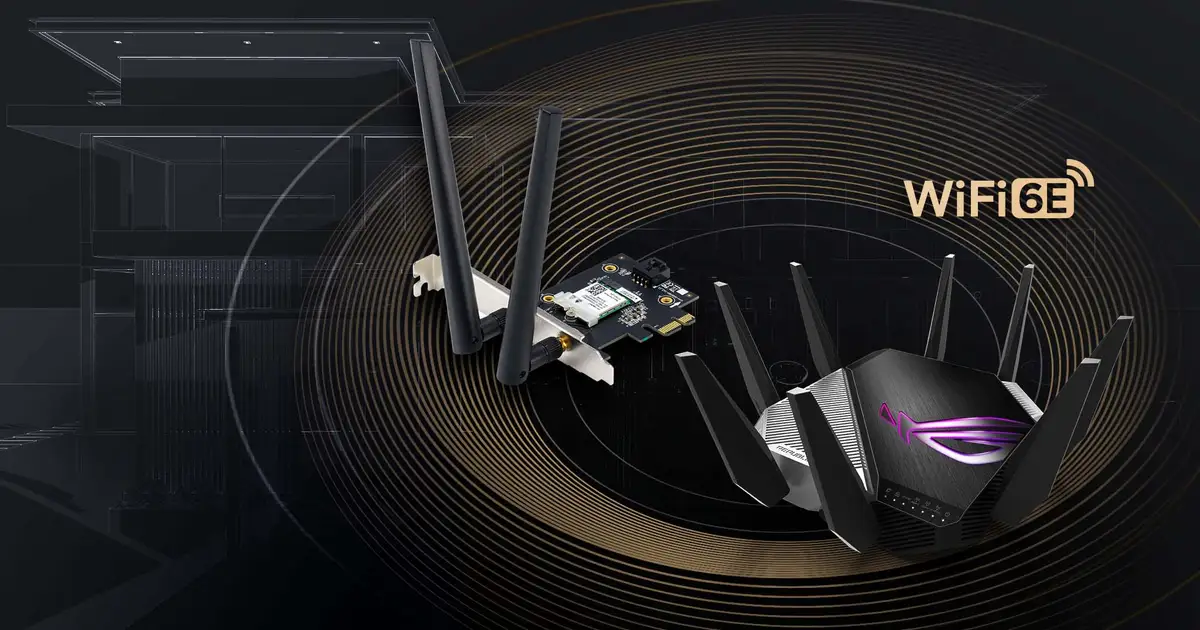
A: The adapter, two external antennas, a low-profile bracket, an internal USB cable, quick start guide, and warranty card.
Final Verdict
Buy if you’re on a modern Windows desktop needing both Wi-Fi 6 and Bluetooth with strong, stable performance. Avoid if your motherboard is older or you lack an internal USB header—driver and compatibility issues could render it unusable. Pro tip from the community: Connect the Bluetooth cable before first boot and download drivers directly from ASUS to avoid setup headaches.





