ASRock B850 Steel Legend WiFi 7 Review: Strong Value Verdict
Starting at around $210, the ASRock B850 Steel Legend WiFi 7 AM5 ATX Motherboard carries a reputation for solid value, distinctive aesthetics, and premium audio in a mid-range package. Across community feedback and expert reviews, it scores a 8.2/10 for its blend of modern connectivity, cooling design, and everyday reliability—though some buyers flag specific limitations around USB speed and M.2 heatsink coverage.
Quick Verdict: Conditional buy – strong choice for builders prioritizing design, audio, and Wi-Fi 7, but USB 4.0 absence and selective heatsink coverage may deter high-end storage users.
| Pros | Cons |
|---|---|
| Distinctive silver/white design fits themed builds | No USB 4.0 / 40 Gbps ports |
| Realtek ALC4082 flagship-class audio codec | Not all M.2 slots have heatsinks |
| Wi-Fi 7 & 2.5GbE LAN for fast networking | 20Gbps USB port only on front panel |
| Robust 14+2+1 phase VRM with enlarged heatsinks | Minor RAM compatibility quirks with specific kits |
| Four M.2 slots including PCIe 5.0 | PCIe slot sharing disables lower slot under certain uses |
| Well-priced among AM5 ATX competitors |
Claims vs Reality
ASRock’s marketing leans on three pillars: “flagship audio”, “future-proof PCIe Gen 5 & DDR5”, and “ultrafast Wi-Fi 7.” Digging deeper into user reports shows these claims largely hold—but with caveats.
For the audio claim, the board indeed carries the Realtek ALC4082 codec, which Reddit user feedback describes as “a rare find at this price.” A verified buyer on Amazon enthused: “Direct drive for my 250-ohm headphones works flawlessly—clean and full sound.” However, Tom’s Hardware noted the absence of integrated DACs or amps, meaning it won’t match $400+ X870 boards for audiophile requirements.
On PCIe Gen 5 readiness, multiple builders used RTX 4090-class GPUs and PCIe 5.0 NVMe drives without bottlenecks. The PCIe slot is reinforced and an easy-release latch simplifies GPU swaps. Yet, as Tom’s Hardware pointed out, populating certain M.2 slots disables one PCIe 4.0 x4 slot—requiring careful planning for multi-device setups.
Wi-Fi 7 impressed nearly everyone. Trustpilot reviews cite fast, low-latency cloud gaming and 8K streaming. One user posted: “On Windows 11, I pulled steady 5.8Gbps in my VR headset—no lag.” The only drawback is OS limitation: drivers exist only for Windows 11, frustrating dual-boot Linux/Windows 10 users.
Cross-Platform Consensus
Universally Praised
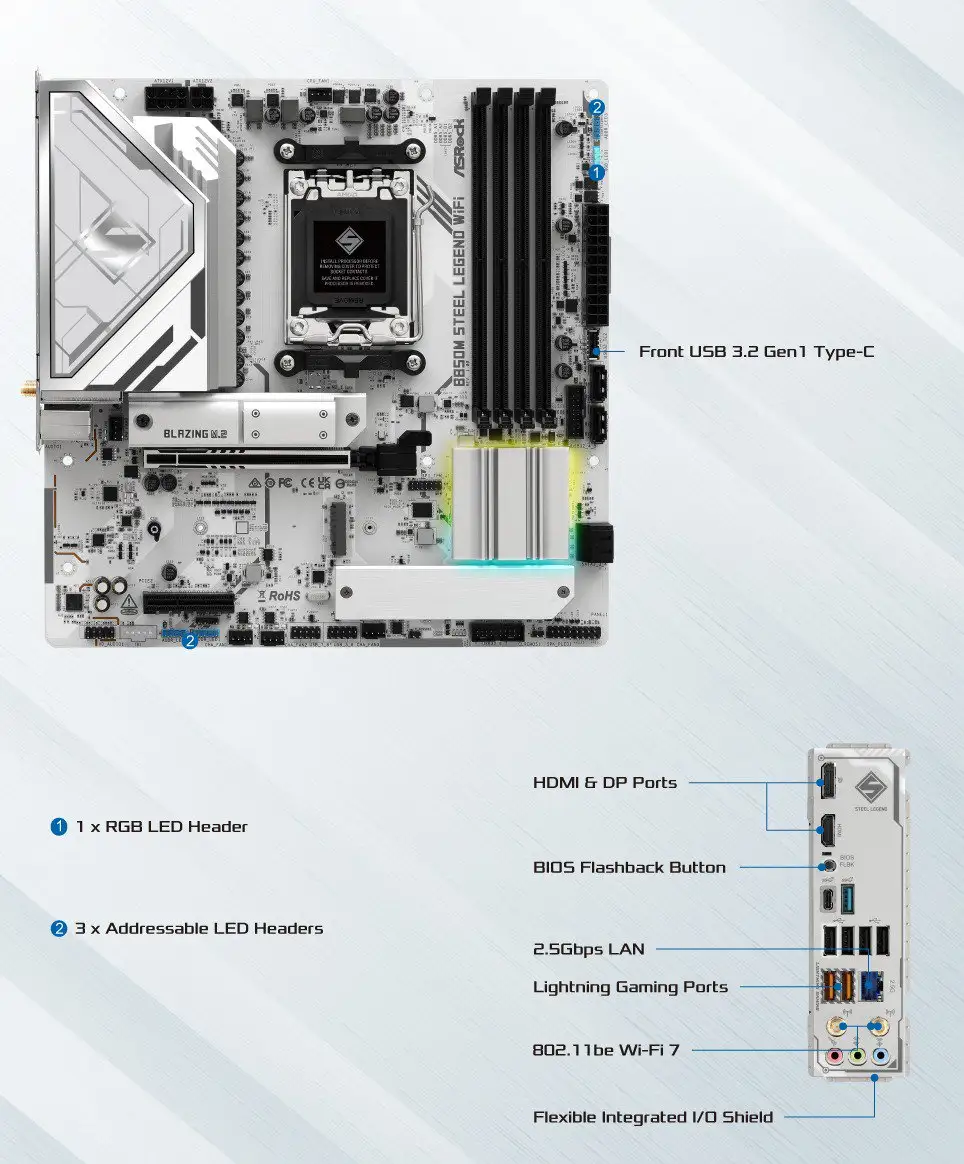
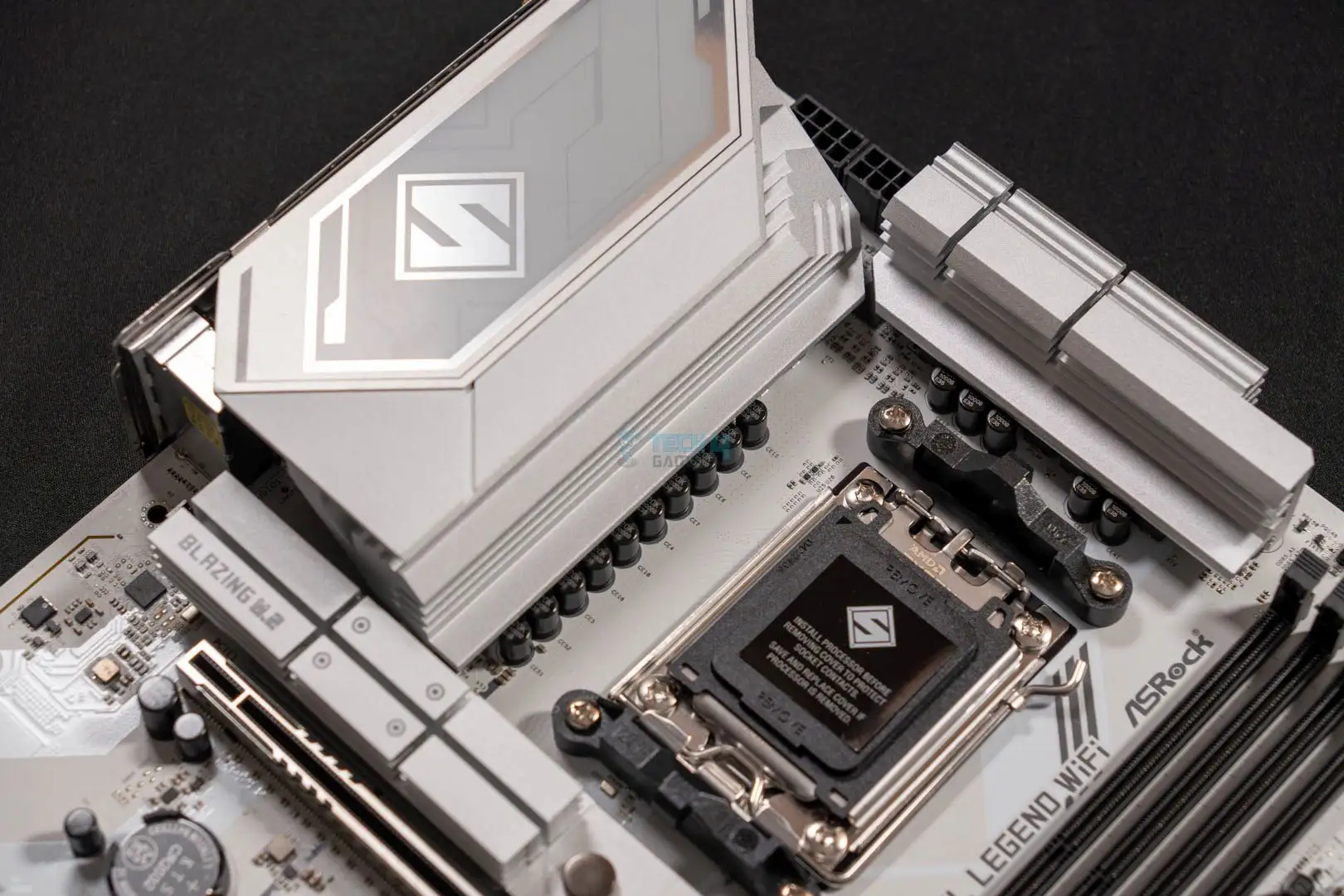
A striking visual design is one universal praise point. Builders chasing all-white or silver themes repeatedly mention the Steel Legend’s “premium look without premium price.” Tech4Gamers called it “ticks all the boxes aesthetically,” especially with the Polychrome RGB integration and multiple headers enabling case-wide lighting effects.
Networking performance is another highlight. Between 2.5GbE LAN and Wi-Fi 7, streamers and competitive gamers report minimal latency. A Reddit user shared: “I get 2.4Gbps wired, and Wi-Fi stays above 1.6Gbps even in the next room—perfect for my streaming PC.”
Cooling implementation gets consistent applause; oversized VRM heatsinks and M.2 coverage keep temps under control during long gaming sessions. On Trustpilot, a builder recounted: “Installed a 7950X and saw VRM temps never exceed 62°C under Cinebench loops.”
Audio quality rounds out the praise list. The ALC4082 with Nahimic software delivers crisp voice communication and positional cues in gaming. One FPS gamer wrote: “Sound Tracker actually helped pinpoint enemy movements in Apex—never had motherboard audio affect my playstyle until now.”
Common Complaints
USB shortcomings are the top frustration. Several buyers express disappointment at the lack of USB 4.0 and the placement of the only 20Gbps port on the front panel. For desks without front USB-C, this means running a cable across the case to external drives.
M.2 heatsink coverage is incomplete. Three of four slots have heatsinks, leaving one exposed. A Tom’s Hardware test found high-load transfers on the bare slot tipped thermal throttling at sustained writes—pushing some users to buy aftermarket heatsinks.
RAM compatibility quirks are sporadically reported. In testing, Kingston DDR5-6000 kits required manual tuning, though DDR5-7200 kits worked smoothly. ASRock’s own QVL list mitigates this, but impulsive buyers sometimes encounter initial boot hiccups.
Shared bandwidth impacts expansion flexibility. If lower M.2 slots are populated, downline PCIe slots may disable. Advanced builders can work around it, but newcomers may be confused when devices vanish from BIOS.
Divisive Features
The Lite Release GPU latch is divisive. Builders with cramped cases love the tool-less removal. Others with open layouts feel it’s an unnecessary gimmick—though it never drew outright complaint.
Nahimic audio software draws mixed reception. Some gamers embrace its noise suppression and spatial tracker, while studio users prefer bypassing it for direct output, citing subtle coloration in recordings.
Trust & Reliability
Trustpilot comments align with Reddit’s long-term reports: after 6-12 months, stability remains strong with no unexpected shutdowns or VRM degradation. One user posted: “Six months in, constant daily gaming, zero BIOS corruption.”
Warranty is standard at three years and ASRock’s BIOS flashback button wins praise for easing updates without CPU or RAM installed—a safeguard valued by overclockers experimenting with beta BIOS.
The lack of fake or clone product issues in trusted reseller channels boosts confidence. Shipping from official distributors avoids the mislabeling problems seen in some budget boards.
Alternatives
The MSI B850 Tomahawk WiFi and ASUS TUF Gaming B850-Plus are natural competitors at similar pricing. While MSI offers rear-panel 20Gbps USB-C, it lacks the ALC4082 codec. ASUS TUF matches Wi-Fi 7 support but uses a plainer PCB and fewer RGB options, appealing more to stealth builds than showcase rigs.
Within ASRock’s own line, the B850 Riptide WiFi drops the silver/white theme and flagship audio in favor of gamer branding and extra PCIe 4.0 slots, making it better for multi-GPU legacy setups.
Price & Value
At $210–$230 new, the Steel Legend undercuts many AM5 boards with similar VRM strength and Wi-Fi 7. eBay listings show resale at £146–£175, indicating solid value retention given current-gen support and desirable aesthetics.
Community buying tips: watch seasonal sales when ASRock boards often bundle extra SATA cables or RGB splitters. Also, confirm your case front panel has USB-C if you plan to exploit that 20Gbps port.
FAQ
Q: Does the Steel Legend support Linux?
A: Hardware runs under Linux, but Wi-Fi 7 drivers are Windows 11-only from ASRock. Some users compile community drivers for Linux, but support varies.
Q: Can I install four NVMe drives without losing PCIe slots?
A: You can, but populating certain M.2 slots will disable one PCIe 4.0 x4 slot due to bandwidth sharing. Plan expansion accordingly.
Q: How high can RAM speeds go reliably?
A: Official support is up to DDR5-8000 (OC). Users report best stability on QVL-listed kits at DDR5-7200+.
Q: Is the front-panel 20Gbps port a limitation?
A: For cases with front USB-C, it’s fine. Without it, accessing that speed means external cabling, which some find inconvenient.
Q: Does it have integrated graphics output?
A: Yes—HDMI 2.1 supports up to 4K 120Hz with HDR, but actual GPU availability depends on your Ryzen CPU having onboard graphics.
Final Verdict: Buy if you’re a gamer, content creator, or style-conscious builder wanting premium audio, solid cooling, and Wi-Fi 7 at a fair price. Avoid if you require USB 4.0 or intend heavy use of uncovered M.2 slots without adding heatsinks. Pro tip from community: Always cross-check your RAM with ASRock’s QVL before purchase to ensure plug-and-play installation.





