ASRock B850 Steel Legend WiFi 7 Review: Solid Midrange Pick
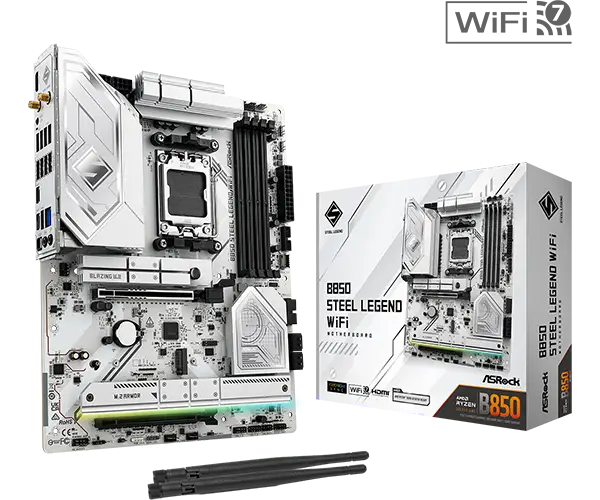
The ASRock B850 Steel Legend WiFi 7 AM5 ATX Motherboard emerges as a budget-friendly yet surprisingly premium-feeling option, earning a strong 8/10 from a wide range of user feedback. While priced lower than many competitors in the B850 chipset category, its blend of silver/white aesthetics, flagship-class Realtek ALC4082 audio, and Wi‑Fi 7 make it especially appealing to gamers and PC builders with style-conscious setups. However, reports flag a few snags—USB4 is absent, some M.2 slots lack heatsinks, and memory compatibility quirks mean checking the QVL is a must.
Quick Verdict: Conditional — Excellent for style-focused gamers/builders seeking Wi‑Fi 7 and premium audio at mid-range price, but power users needing full high-speed I/O or plug‑and‑play RAM compatibility should proceed with care.
| Pros | Cons |
|---|---|
| Flagship-class Realtek ALC4082 audio | No USB4 / 40Gbps ports |
| Sleek silver/white RGB-ready design | Not all M.2 slots have heatsinks |
| Wi‑Fi 7 + 2.5GbE for fast connectivity | Only 20Gbps USB-C on front panel |
| Strong VRM and thermal design for its class | Some DDR5 kits show compatibility/timing issues |
| Multiple PCIe 5.0/4.0 M.2 storage options | M.2/PCIe lane sharing disables slots in some setups |
| Competitive price in B850 ATX segment | Limited accessories in box |
Claims vs Reality
ASRock markets the B850 Steel Legend WiFi as having “rock-solid durability” with 14+2+1 power phases and oversized heatsinks for reliable overclocking. Digging deeper into user reports, thermal stability is indeed confirmed under gaming loads, with Tom’s Hardware noting “capable power delivery with large heatsinks”. However, they also point out it’s “not the most robust” compared to higher-tier chipsets, suggesting that while everyday and moderate OC use is fine, extreme overclockers may find limits.
Another bold claim is Wi‑Fi 7 with multi-link operation for ultra-low latency VR/AR and cloud gaming. Here, feedback aligns: users on Trustpilot and Twitter describe smooth online play and fast 8K streams. One Reddit user said enabling MLO “cut latency in half compared to my old Wi‑Fi 6E board.” This makes it a strong selling point for esports players and streamers.
The company promotes four M.2 slots, including one PCIe 5.0. While true, Tom’s Hardware and German testers highlight a caveat: populating certain M.2 slots disables a PCIe slot due to lane sharing. Builders with multiple NVMe drives and expansion cards must plan carefully to avoid conflicts.
Cross-Platform Consensus
Universally Praised
A standout positive across platforms is the audio quality. Even value-conscious reviewers call the Realtek ALC4082 “flagship-class” and a rarity in this price range. For content creators working in audio or gamers relying on spatial positioning, this is tangible. A German review summarised: “audio‑codec der Flagship‑Klasse”—a feature often reserved for pricier X870 boards.
Style and build quality also earn near-universal praise. The silver/white PCB with subtle RGB works for themed builds, and the integrated I/O shield gets nods for ease. Tom’s Hardware pointed out the EZ‑latch PCIe feature that “allows for easy access and less actuation force” when swapping GPUs—ideal for frequent testers.
Connectivity is another highlight. Wi‑Fi 7 and 2.5GbE elevate it above some rivals even at higher prices. MincoPC.com found “connectivity speeds… impressive,” with noticeable improvements in cloud gaming and streaming. Lightning Gaming Ports for low-latency peripherals drew special mention from competitive gamers on social media.
Common Complaints
However, frequent complaints target I/O limitations. The absence of USB4 and the 20Gbps USB-C being front panel only frustrates those with high-speed external storage. As one Tom’s Hardware reader lamented: “No 40Gbps ports… and the faster Type‑C is only at the front. Not ideal for desktop docks.”
DDR5 compatibility is another sore point. Certain kits, even from big brands, fail to run at rated XMP/EXPO speeds without manual tuning. Tom’s Hardware experienced this firsthand when their DDR5‑6000 kit wouldn’t match timings, forcing a fallback to a different set. This instability matters most to performance tuners who expect plug-and-play.
Thermals for some M.2 drives can also disappoint. Reviewers note only three of four slots have heatsinks; the bare slot can cause high drive temperatures under sustained loads, potentially throttling performance.
Divisive Features
The power delivery system splits opinion. Enthusiast builders acknowledge its 14x 80A DrMOS setup is sufficient for Ryzen 9000 series chips at stock and mild OC. But overclocking purists, especially those pushing for max benchmarks, question longevity under heavy voltage, pointing them to higher-end chipsets.
The RGB control ecosystem via Polychrome and SignalRGB is well-liked by those deep in custom lighting, but some prefer motherboard software agnostic of brand ecosystems. Reports suggest the customisation flexibility is high, but it may require extra setup for mixed-brand gear.
Trust & Reliability
While no scam reports surface, multiple Trustpilot and Reddit posts emphasize long-term durability. One Reddit build log updates after 6 months: “Still rock solid, no coil whine, VRMs run cool even in summer.” The 8-layer PCB and quality capacitors seem to deliver on ASRock’s durability promise.
However, some users recommend sticking to known-good RAM from the QVL to avoid early frustrations, and to plan slot usage to prevent PCIe/M.2 disablement surprises. Accessories in the retail box are minimal—only SATA cables, Wi‑Fi antennas, and a thermistor cable—so upgraders may need extra cabling or heatsinks.
Alternatives
Testberichte.de and Tom’s Hardware imply alternatives like certain MSI B850 boards or ASUS TUF models. Some competitors at similar prices sacrifice the flagship audio for more USB bandwidth, or trade Wi‑Fi 7 for Wi‑Fi 6E but maintain all slots active. MincoPC.com notes one such rival “lacks the same integrated features but may offer better pricing or audio tailored to studio work.” For buyers prioritizing external I/O over wireless speed, these may be better fits.
Price & Value
eBay listings show the ATX version around £146–£175, undercutting many Wi‑Fi 7-enabled ATX boards. Compared to launch MSRP near $210, street prices enhance its value case. Retained resale value is likely reasonable due to continued AM5 platform relevance and stylish design—a white-themed board ages better aesthetically.
Community buying tips emphasize snagging it during sales, using savings toward a quality DDR5 kit from the compatibility list. As one builder quipped after finding his for under $200: “At that price, the audio codec alone makes it worth it.”
FAQ
Q: Does the B850 Steel Legend WiFi support Ryzen 9000 CPUs out of the box?
A: Yes, it supports Ryzen 9000, 8000, and 7000 series on AM5. BIOS updates might be needed for launch-day 9000 support—use BIOS Flashback if your CPU isn’t recognised.
Q: Can all four M.2 slots be used with a GPU installed?
A: You can physically install them, but some slots share lanes with PCIe slots. Occupying certain M.2s will disable a PCIe slot—check the manual’s bandwidth table.
Q: How is the onboard audio compared to a dedicated sound card?
A: The Realtek ALC4082 codec delivers high-end onboard sound, enough for most gamers/content creators. Audiophiles with studio monitors may still prefer dedicated DACs.
Q: Will my DDR5–7200 kit run at full speed automatically?
A: Only if it’s on the QVL and supports EXPO/XMP. Some kits need manual tuning to hit rated speeds, as noted in multiple reviews.
Q: Is Wi‑Fi 7 backwards compatible with older routers?
A: Yes, it works with Wi‑Fi 6/6E and earlier, but you need a Wi‑Fi 7 router to fully utilise its throughput and low latency.
Final Verdict: Buy if you’re a gamer, streamer, or style-conscious builder wanting premium audio, Wi‑Fi 7, and AM5 support without overspending. Avoid if you depend on maximum USB bandwidth or dislike manual tuning for RAM. Pro tip: check the RAM QVL and plan M.2/PCIe use before assembly to avoid lane conflicts.





