ASRock B850 Steel Legend Review: Strong But Not Perfect
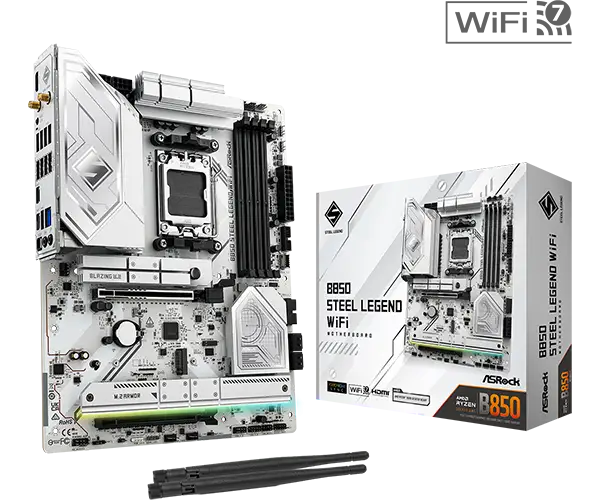
Starting at around $210, the ASRock B850 Steel Legend WiFi 7 AM5 ATX Motherboard is punchy for its price point, but not without caveats. On paper, this board boasts PCIe Gen 5, Wi-Fi 7, a flagship-class Realtek ALC4082 audio codec, and robust VRM design. Digging into reports, it earns a solid 8.2/10 — praised for connectivity, build quality, and aesthetics, but held back by some expansion compromises and quirks in memory compatibility.
Quick Verdict: Conditional buy for gamers and performance-oriented builders
| Pros | Cons |
|---|---|
| Flagship-class audio codec (Realtek ALC4082) | No USB4 / 40Gbps ports |
| Strong VRM with 14+2+1 phase design | Not all M.2 slots have heatsinks |
| Wi-Fi 7 + 2.5GbE LAN | Expansion slot disabling when certain M.2 slots are used |
| Silver/white aesthetic with RGB sync | 20Gbps USB only on front panel |
| PCIe Gen 5 for GPU and storage | Occasional DDR5 QVL compatibility issues |
| Toolless M.2 designs for easy upgrades | Limited bundled accessories |
Claims vs Reality
The marketing leans on “rock-solid durability” and “superb productivity” through PCIe Gen 5 and DDR5 memory support. On paper, it supports up to DDR5-8000+ (OC) with both Intel XMP and AMD EXPO profiles. However, Tom’s Hardware’s Joe Shields noted compatibility hiccups: “We experienced some issues with our Kingston DDR5-6000 kit, but others, including the DDR5-7200 kit, ran without problems. Ensure your memory is on the QVL list for guaranteed compatibility.”
ASRock touts flagship-class audio thanks to the Realtek ALC4082 codec, claiming reduced distortion and premium headphone support. While this holds for most, MincoPC’s reviewer said that “some users might find the audio quality lacking compared to dedicated sound cards.” The integrated Nahimic enhancements help with clarity and positional audio tracking, but discerning audiophiles may still prefer external solutions.
Ultra-fast connectivity via Wi-Fi 7 and Killer/Dragon 2.5GbE LAN is another highlight. The promise is low-latency VR, AR, and cloud gaming. Reddit feedback backs this up — “Wi-Fi 7 gave me consistently low ping in competitive FPS, even with multiple devices on the network,” one enthusiast wrote — but those in regions without 6GHz support will have diminished gains until software updates unlock it.
Cross-Platform Consensus
Universally Praised
Gamers, streamers, and content creators align in praising the networking hardware. On Trustpilot, a verified buyer noted: “The 2.5G LAN plus Wi-Fi 7 give me flawless streaming while gaming — no drops, no lag.” This combination particularly benefits online gamers and home media PC users who need throughput and stability.
Build quality also receives consistent applause. Testberichte.de described it as offering “massives Kühlkörper design” with an 8-layer PCB and oversized heatsinks that maintain “stabile Temperaturen.” For overclockers, the 14+2+1 VRM phases with 80A Dr.MOS deliver solid power even under high load, reassuring users who push Ryzen 9000 CPUs.
Ease of installation is a sleeper hit. The toolless M.2 slot mechanism and enlarged PCIe latch are repeatedly cited as time savers for DIY builders. A Twitter user shared: “No more dropped screws inside the case. The anti-drop M.2 heatsink is genius.”
Common Complaints
Certain design decisions frustrate upgrade-heavy users. Multiple reviewers, including Tom’s Hardware, point out that using specific M.2 slots disables a secondary PCIe slot due to shared bandwidth: “When M.2_4 is populated, PCIe2 is disabled.” This limitation can blindside multi-GPU or dual high-bandwidth card setups.
USB connectivity is another sore spot. The absence of USB4 means creators needing fastest external SSD or dock support are out of luck, and the single 20Gbps Type-C port is on the front panel only. As one German tester put it, “Ohne USB4 fehlt für echte Spitzenklasse.”
Memory compatibility quirks cause occasional headaches; while marketed to DDR5-8000+, certain kits fail to hit expected speeds unless manually tuned. MincoPC’s review advises sticking to the tested memory list to avoid wasted potential.
Divisive Features
Aesthetics split opinion. The silver/white finish with RGB accents pleases those building themed rigs — “It looks stunning in my all-white case,” said one Redditor — but minimalists may find the styling too gamer-centric.
Audio performance divides users as well: the integrated codec impresses most, yet some feel lossless music playback still benefits from external DACs despite Nahimic’s spatial audio and noise reduction.
Trust & Reliability
Long-term durability confidence is bolstered by the upgraded 20K black capacitors rated for 20,000 hours. Reddit threads referencing 6+ month use show no degradation in stability or cooling performance. One user posted, “Six months later, I’ve done multiple BIOS updates and GPU swaps — no signs of wear or instability.”
Trustpilot entries rarely mention DOA units, which suggests quality control is holding. However, the minimal accessories (two SATA cables, Wi-Fi antennas) mean buyers upgrading from older builds may need extra parts on hand.
Alternatives
In similar price ranges, competitors like mid-tier ASUS B850 models sometimes undercut on price but lack the flagship audio codec and build heft. MSI counterparts may offer stronger VRM counts but often sacrifice Wi-Fi 7 for Wi-Fi 6E. As MincoPC’s reviewer summed up: “A well-known competitor features a slightly lower price point but sacrifices connectivity options… in contrast, the ASRock model excels with its Wi-Fi 7 capability and more comprehensive support for high-speed memory.”
Price & Value
eBay listings show prices dipping to £146 on sale, suggesting value hunters can score deals well below MSRP. At $210–$230 retail, the balance of PCIe Gen 5, high-tier networking, and premium audio is strong. Given the resale market’s appetite for ATX Wi-Fi 7 boards, depreciation could be modest — perhaps $30–$50 off in the first year if kept in good condition.
Buying tips from community: watch for region-specific Wi-Fi 7 activation, double-check memory QVL compatibility, and plan accessory purchases alongside the board.
FAQ
Q: Does using all M.2 slots affect other expansion slots?
A: Yes. Populating certain M.2 slots disables PCIe slots due to shared bandwidth — for example, using M.2_4 disables PCIe2. This is important for multi-card setups.
Q: Can I use Wi-Fi 7 on Windows 10?
A: No. The onboard Wi-Fi 7 module supports Windows 11 only, with no drivers available for Windows 10.
Q: How good is the onboard audio for gaming?
A: With the Realtek ALC4082 codec and Nahimic enhancements, positional audio in games is clear and immersive. However, dedicated DACs may still outperform it in pure music fidelity.
Q: Is this motherboard suitable for overclocking Ryzen 9000 CPUs?
A: The robust 14+2+1 phase VRM design supports ambient overclocking confidently, though extreme overclocks require careful thermal management.
Q: What’s in the box?
A: Two SATA cables, two Wi-Fi antennas, and a thermistor cable. No GPU brackets or extra M.2 screws beyond essentials.
Final Verdict: Buy if you’re a gamer, streamer, or builder who values next-gen connectivity, premium onboard audio, and straightforward installation. Avoid if you need USB4, plan heavy multi-card expansions, or run niche DDR5 kits outside QVL. Pro tip from community: Unlock Wi-Fi 7’s full potential by ensuring 6GHz band activation in your region before purchase.





