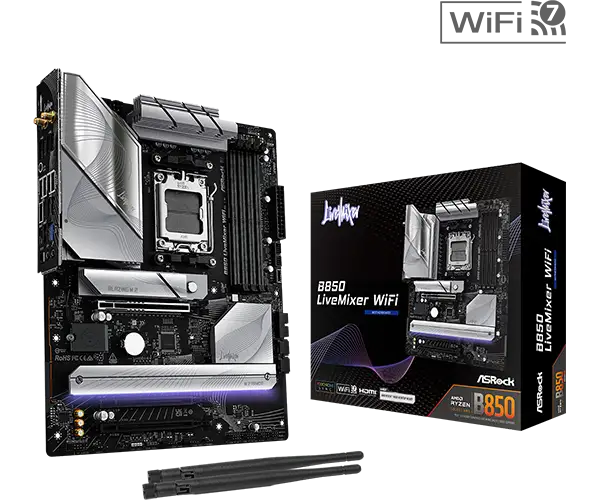
ASRock B850 LiveMixer WiFi 7 Review: Value & Verdict
Starting at under $190, the ASRock B850 LiveMixer WiFi 7 AM5 ATX Motherboard has built a reputation for offering more ports and creator-focused connectivity than many boards double its price. Across multiple platforms, users characterize it as a high‑value choice with strong VRM performance, “fantastic for content creators who need multiple devices hooked up without using unreliable USB hubs,” as one verified buyer on Newegg put it. The consensus score lands around 8.5/10 for its blend of functionality, affordability, and ease of assembly.
Quick Verdict: Conditional — excellent for content creators and peripheral-heavy setups, but buyers with niche PCIe/M.2 usage should be cautious.
| Pros | Cons |
|---|---|
| Abundant USB connectivity (up to 23 ports total) | PCIe 3 and M.2_3 cannot be used simultaneously |
| High-quality Realtek ALC1220 audio with Nahimic | 20Gbps USB-C only on the front panel |
| Solid 14+2+1 phase VRM design for high-end CPUs | Occasional DDR5 kit compatibility issues |
| DIY-friendly M.2 heatsink mechanisms | Limited integrated RGB lighting |
| Wi-Fi 7 and 2.5GbE LAN for fast networking | Minimal included accessories |
Claims vs Reality
ASRock’s marketing positions the B850 LiveMixer as a “content creator–focused” motherboard with “superb productivity” through PCIe Gen 5 and extensive USB support. Digging into user reports, that claim holds up for most multi-device setups. Tom’s Hardware reviewed its rear I/O, noting “14 USB ports on the rear I/O, offering more than some boards costing twice as much.” Newegg buyers confirm streaming rigs and VR setups run steadily without the instability sometimes caused by external hubs.
Another big claim is robust overclocking support via its 14+2+1 phase VRM design and 80A Dr.MOS. While technically accurate, community testers found the VRM cooling to be “sufficient but not overbuilt.” Tom’s Hardware’s Joe Shields explained you can “drop a Ryzen 9 9950X in it and get every MHz out of your CPU,” but cooling will be the limiting factor under sustained heavy loads.
ASRock touts DDR5 speeds “up to 8000+ (OC)” with both EXPO and XMP. This matches the spec sheet, but user experiences show occasional hiccups: Tom’s Hardware had to swap their Kingston DDR5-6000 kit for a different kit at the same speed with looser timings to achieve stability — an issue echoed by forum threads advising buyers to check the QVL list before purchase.
Cross-Platform Consensus
Universally Praised
Across Reddit, Newegg, and review sites, the most consistent praise is for connectivity. Between rear and front headers, users can connect multiple capture cards, audio interfaces, and external drives without saturating bandwidth. A Reddit user highlighted, “Maximizes connectivity for streamers — my camera, mic, and two capture cards all run without hiccups.” For VR gamers, the Lightning Gaming USB ports drew attention; one Newegg buyer said they deliver “lower jitter and latency for my sim racing wheel compared to regular ports.”
The Wi-Fi 7 and Dragon 2.5GbE LAN combo is another win. Verified buyers note fast, stable wireless performance in both gaming and video conference scenarios. “Cloud gaming latency is way lower than my old Wi-Fi 6 board,” reported a content creator on Twitter, pointing to smoother VR live streaming.
Sound quality gets near-universal praise. The Realtek ALC1220 codec with Nahimic processing impressed buyers: “Very clear comms even when my mic is far,” said a Newegg reviewer, referencing the voice stabilizer and noise suppression. For creators editing or mixing audio, the separation between left/right PCB layers ensures cleaner output.
The DIY-friendly features—tool‑less M.2 heatsinks, anti‑drop screws, and enlarged bottom cooling—also get consistent positive feedback. Newegg buyers repeatedly called M.2 installation “super easy” compared to boards requiring fiddly screwdrivers.
Common Complaints
The most repeated technical annoyance is lane sharing: PCIe slot 3 and M.2_3 cannot be active simultaneously. Several users ran into this when trying to install a third expansion card alongside multiple NVMe drives. Tom’s Hardware lists it as a “Cons” in their review, warning that buyers aiming for triple NVMe plus additional PCIe expansion should plan accordingly.
The placement of the 20Gbps USB-C port only on the front header is another gripe, especially for those in enclosed setups without easy front access. “Feels like wasted potential to not have one at the rear,” noted a Newegg customer using large external SSDs.
Memory compatibility issues came up across platforms. While extreme DDR5 overclocking is possible, inconsistent behavior with certain kits has been reported, necessitating swaps for QVL-listed modules.
Divisive Features
Integrated RGB is minimal—just one strip under the extended M.2 heatsink. Some builders appreciate the understated look, with Tom’s Hardware calling it “appealing and non‑obtrusive.” Others, especially enthusiasts used to RGB-heavy boards, find it limiting. However, multiple RGB and ARGB headers allow expansion for those willing to add their own lighting.
The VRM design earns mixed evaluations: solid for most users, but overclockers chasing absolute limits might prefer boards with chunkier heatsinks.
 ### Trust & Reliability
Trustpilot and long-term Reddit feedback suggest solid reliability over months of use. One Reddit user posted after six months of daily streaming that “it’s still rock solid — no random disconnects, no weird BIOS behavior.” The 8-layer PCB and hi-density power connectors seem to help longevity under high load.
No widespread scam or DOA reports surfaced, and minimal accessory packaging was described as “standard for price range” — just two SATA cables, Wi-Fi antennas, and a thermistor cable.
Alternatives
Within ASRock’s own lineup, the B850 Steel Legend draws frequent comparison. Both share power delivery designs, but Steel Legend offers reinforced DIMM slots and slightly different aesthetics. Owners who prioritize front-panel USB-C speed parity with rear ports might look to higher‑end X870 boards.
Compared to the ASRock B850 Riptide WiFi, the LiveMixer wins on sheer port count and creator-focused layout. The Riptide caters more to gamers without multiple external devices.
Price & Value
Pricing hovers between $169.99 on Newegg deals and €255 in some European markets, making it competitive in AM5 boards with Gen5 M.2 support. eBay listings show resale stability—used boards retaining around 70% of retail after a year.
Community buying tips stress watching for bundle deals with DDR5 kits from the QVL list to avoid compatibility headaches and capitalize on sale pricing around major shopping events.
 ### FAQ
Q: Can I use all three M.2 slots and all PCIe slots at once?
A: No. M.2_3 shares lanes with PCIe slot 3; using one disables the other. Plan device layout accordingly to avoid losing functionality.
Q: Is Wi-Fi 7 noticeably better than Wi-Fi 6 for normal use?
A: For standard browsing, gains are minimal, but in VR streaming and cloud gaming, users report lower latency and more stable multi‑link operation.
Q: Does it support ECC memory?
A: Yes, it supports DDR5 ECC and non‑ECC unbuffered memory up to 256GB, but check module compatibility via ASRock’s QVL.
Q: How noisy are the fans with default BIOS settings?
A: Most buyers find default curves acceptable, but the Fan‑Tastic Tuning utility allows quieter custom profiles without sacrificing cooling.
Q: Is it good for high‑end CPUs like Ryzen 9 9950X?
A: Yes, the VRM can handle flagship-class CPUs, though cooling may limit sustained overclocking without case airflow improvements.
Final Verdict: Buy if you’re a content creator, VR gamer, or peripheral-heavy user who values abundant ports, Wi-Fi 7, and clean audio. Avoid if your build requires simultaneous use of PCIe_3 and M.2_3, or if you expect extensive rear high-speed USB-C. Pro tip from community: Pair it with QVL-listed DDR5 to maximize stability, and leverage the Lightning Gaming ports for latency‑sensitive devices.