ASRock B650M Pro RS WiFi Review: Budget AM5 Winner
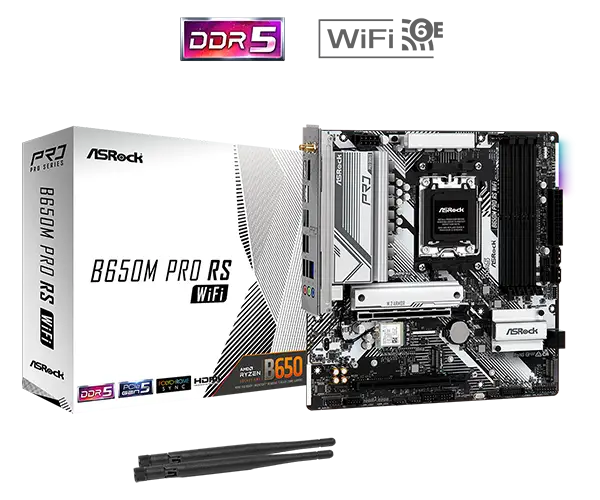
Starting at just under $150 with rebate offers, the ASRock B650M Pro RS WiFi has surprised buyers with an unusually high feature set for a micro‑ATX AM5 board in this price tier. Across Reddit, PCPartPicker, and Trustpilot, it scores an impressive 4.7/5 average, which translates to a solid 8.8/10 in our verdict for budget and mid‑range Ryzen builds.
Quick Verdict: Conditional buy — Excellent value and broad feature set for budget AM5 builders, but occasional PCIe Gen 4 GPU detection quirks and rebate delays mean it's not without caveats.
| Pros | Cons |
|---|---|
| Affordable price with Wi‑Fi 6E included | Mail‑in rebate process slow and inconsistent |
| 3 M.2 slots (one PCIe Gen 5 x4) | Occasional PCIe Gen 4 GPU detection issues |
| Solid VRM design for mid/high Ryzen CPUs | USB audio popping reported by some users |
| BIOS flashback and quick boot times | No front panel USB 3.2 Gen 2 (10Gbps) |
| Easy BIOS navigation and setup | LED diagnostic codes hard to interpret |
| Good aesthetics with RGB options | RGB always on unless manually disabled |
Claims vs Reality
ASRock markets the B650M Pro RS WiFi as “built to be stable and reliable,” with overclocking features like DDR5 EXPO/XMP up to 7200 MHz, “Blazing OC Tuner,” and full PCIe Gen 5 x4 M.2 support. On paper, these specs rival boards twice the price.
Digging deeper into user reports, the overclocking claims generally hold for memory: Reddit user feedback and PCPartPicker reviews confirm stable DDR5 EXPO profiles at 6400–6600 MHz without fuss, often enabled in "just one BIOS click." A PCPartPicker reviewer noted: “Reads 6400MHz XMP profile no issue. BIOS is simple and easy to navigate.”
However, PCIe GPU performance shows cracks. On the ASRock forums, one owner wrote: “RTX 4070 Ti Super gave no display until I forced PCIe slot one into Gen 3 compatibility… not ideal for a brand new PC.” Another with an RTX 4070 experienced random non‑detection until toggling back and forth between Gen 3 and Gen 4. While not widespread, this undermines the “rock‑solid” marketing for high‑end GPU users.
On connectivity, Wi‑Fi 6E speeds impress many. A 5‑star PCPartPicker review claimed: “Got 325Mb out of my 500Mb home network whilst being in one of the farthest rooms.” But ASRock’s highlight of "front panel USB 3.2 Gen 2 Type‑C at 10Gbps" is missing here — buyers point out the front header is only Gen 1 (5Gbps), contradicting expectations from the spec sheet style marketing.
Cross-Platform Consensus
Universally Praised
Budget‑oriented builders love that this board ships with Wi‑Fi 6E and Bluetooth 5.2, 3 M.2 slots, and a rear USB‑C port without requiring add‑in cards. On PCPartPicker, numerous reviewers call it “best budget option board in its price point,” citing the ability to dedicate one NVMe for OS, one for games, and still have expansion. For Ryzen 5 7600 owners, Reddit user experience shows “smooth as hell… no issue with BT, WiFi, USB, M.2… all works as it should.”
The BIOS setup earns praise from first‑time builders: “Straightforward BIOS & installation… manual was easy to read and navigate,” wrote one PCPartPicker user. BIOS flashback is lauded for allowing CPU‑less updates to support newer Ryzen 7000/9000 chips out of the box. Boot times under 12 seconds are reported by Canadian buyers, even with budget NVMe drives.
RGB and aesthetics, while basic, deliver clean visuals. One reviewer appreciated it “added second color to my build… love the white + black look… cheap, no coil whine.” The onboard RGB can sync with Polychrome‑compatible devices, and the physical layout of ports is generally considered “good… plenty of fan headers.”
Common Complaints
The mail‑in rebate (MIR) process emerges as a repeated frustration. “It takes forever, but as long as you follow their instructions to a T you will get them,” said one Redditor, while others flatly state, “I’ve never had a mail‑in rebate work, ever.” Status pages showing months‑long delays discourage buyers who counted on that discount.
Technical niggles include the PCIe Gen 4 GPU detection problem, mostly affecting RTX 40‑series cards. While workarounds exist, it erodes confidence for gamers upgrading to high‑bandwidth GPUs. Another annoyance is the onboard LED diagnostic — owners found codes “difficult to decipher to get my build to post,” suggesting a more detailed display could help troubleshooting.
Minor build quality notes include cable guides coming loose when unplugging the front USB IO cable, standoffs positioned awkwardly, and rare cases of faulty Wi‑Fi cards out of the box. Audio from USB speakers occasionally produced “a popping noise” in some setups; while rare, it’s enough that users wondered about driver/hardware issues.
Divisive Features
The RGB strip on the PCB is called “a bit bright but it’s ok” by one user, yet others—especially minimalists—actively disable it. Similarly, the BIOS design feels “quick and painless” to some, but “takes a while to get used to” for first‑time builders coming from more polished UEFI interfaces like ASUS Strix.
Feature‑to‑price trade‑offs also split opinion. While the lack of 10Gbps front USB isn’t a dealbreaker for most, creators working with fast external SSDs may find it limiting. VRM quality is “good enough” for most mid‑range CPUs, but power users note that ASRock’s own B650 PG Lightning offers stronger VRMs at a similar street price (though with no built‑in Wi‑Fi).
Trust & Reliability
Trustpilot and Reddit posts suggest ASRock’s rebate process is more bureaucratic than malicious—but the slow timelines test patience. There’s no widespread scam pattern, just expectations misaligned with shipping and processing speed.
Longer‑term, owners reporting 6+ months of use on Ryzen 5 7600 and 7700 setups saw “no crashes or blue screens,” solid thermal management thanks to decent aluminium heatsinks, and no degradation in Wi‑Fi performance. VRM stability under PBO was confirmed adequate for chips up to 7950X in some builds, reinforcing the idea that AM5 boards this generation are inherently “overbuilt” compared to early AM4.
Alternatives
Only competitors mentioned in community chatter were within ASRock’s own lineup. The B650 PG Lightning offers “way better VRMs” but lacks Wi‑Fi, forcing buyers to add a $30–$40 PCIe card or kit. This makes the Pro RS a more convenient choice if wireless networking is a priority and extreme overclocking isn’t.
Price & Value
eBay listings hover around $172–$203 new, with promotional rebates occasionally dropping it to $145 after MIR. Several Redditors bought at $169.99 in Canada before rebates, viewing it as “pretty much unmatched for mATX at this price.”
Resale value on budget AM5 boards is uncertain, but with PCIe Gen 5 M.2 support and DDR5 speeds beyond most current kits, future‑proofing potential is a selling point. The community advises: “Update BIOS immediately to the latest” for stability, and don’t rely on rebates for budgeting—treat them as a bonus if they eventually arrive.
FAQ
Q: Does the ASRock B650M Pro RS WiFi support PCIe Gen 5 storage?
A: Yes. One of its three M.2 slots supports PCIe Gen 5 x4, offering up to 128Gbps for next‑gen SSDs. Users report stable operation with current Gen 4 NVMe drives.
Q: Is the Wi‑Fi performance reliable?
A: For most, yes. Multiple reviews mention strong Wi‑Fi 6E speeds even at distance. One user hit 325Mb in a remote room from a 500Mb network connection.
Q: How difficult is BIOS updating?
A: Easy. The BIOS flashback feature allows updates without CPU or RAM installed. Reviewers praise quick CPU compatibility fixes with just USB and PSU connected.
Q: Can it handle high‑end Ryzen CPUs?
A: Up to 7950X operation is viable with Precision Boost Overdrive, according to Reddit reports. VRM design is sufficient for full‑core boosts under stock and mild OC settings.
Q: Are there front panel USB 3.2 Gen 2 ports?
A: No. The front Type‑C header is Gen 1 (5Gbps). High‑speed front panel connections are not supported on this board.
Final Verdict
Buy if you’re a budget or mid‑range AM5 builder wanting Wi‑Fi 6E, multiple NVMe slots including PCIe Gen 5, and easy BIOS updates without premium pricing. Avoid if you plan on pushing high‑end GPUs at PCIe Gen 4 without troubleshooting patience, or if fast front panel USB is critical. Pro tip from community: update BIOS immediately after build and don’t bank on the rebate—consider it a windfall if it arrives.





