Arduino UNO R4 Minima Review: Power Boost with Caveats
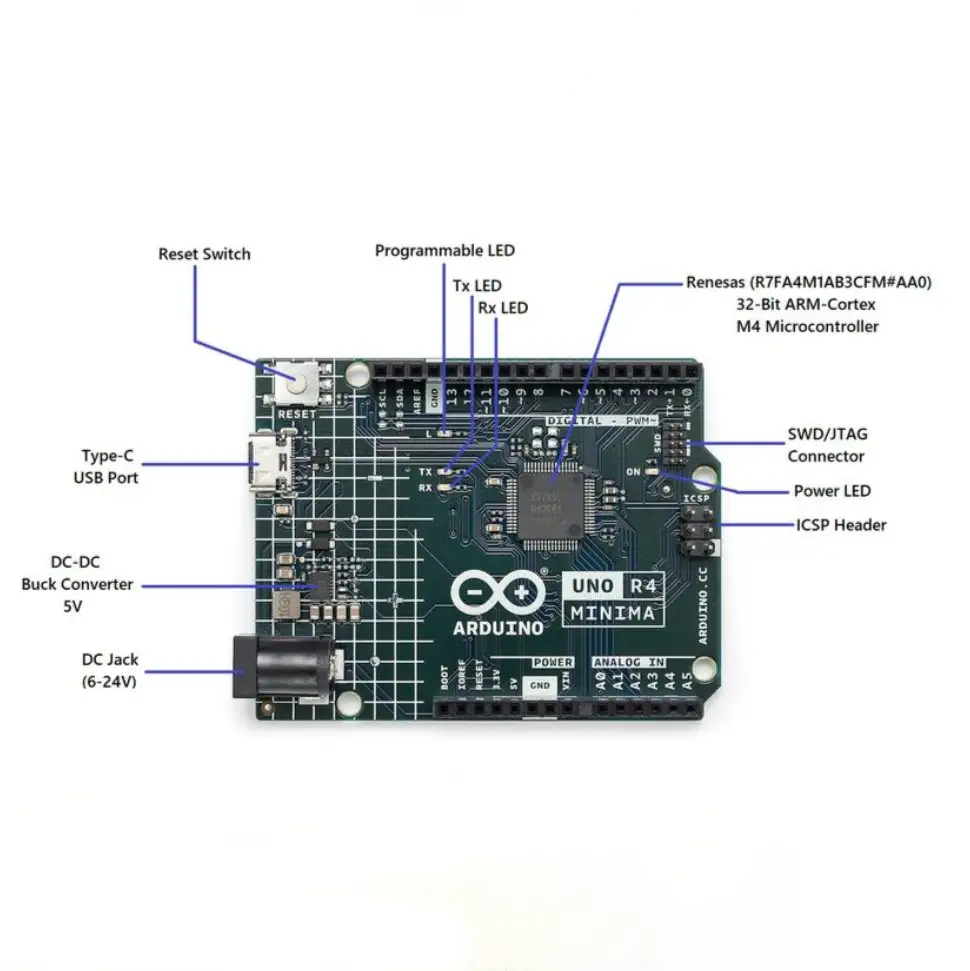
The most surprising finding from the launch of the Arduino UNO R4 Minima is that its most radical upgrade—a 32-bit Renesas RA4M1 MCU—has actually made old UNO projects harder to run without tweaks. While it's faster, offers up to 14-bit ADC resolution, a 12-bit DAC, and operates at a wider 6–24V input range, several long-time Arduino users are reporting compatibility headaches with legacy components and libraries. Based on community sentiment and technical performance, it lands at 7.5/10: a strong step forward for power users, but a bumpy ride for those expecting a drop-in R3 replacement.
Quick Verdict: Conditional
| Pros | Cons |
|---|---|
| Significant performance boost with 48 MHz ARM Cortex-M4 MCU | Reduced 8 mA per I/O pin limit shocks some users |
| Expanded memory (256 KB flash, 32 KB RAM) | Poor compatibility with certain 3.3V I2C devices |
| Added on-board peripherals (DAC, op amp, CAN bus support) | Missing SWD port on WiFi model and missing CAN transceiver |
| USB-C port with HID support | IDE upload issues on Windows and macOS at launch |
| Wider 6–24V input range | Main MCU and WiFi chip run hot, unsuitable for battery projects |
| Maintains UNO form factor for shield compatibility | Some R3 libraries incompatible, requires rewrites |
Claims vs Reality
One of the biggest marketing points is complete hardware compatibility with UNO R3 shields and accessories. Arduino’s official store states: “The UNO R4 Minima maintains the same mechanical and electrical compatibility, allowing you to seamlessly use your existing shields and hardware.” Digging deeper into user reports, this is only partially true. Reddit user feedback highlights, “the 5V IO on these boards is not really compatible with AVR boards… minima doesn’t see devices with high at around 3V,” referring to 3.3V I2C modules that worked fine on R3 but fail here without level shifters.
Another bold claim involves HID support: the board can emulate a keyboard or mouse when connected via USB-C. While some users have successfully run example sketches, others struggle. One Reddit user shared, “HID does work, only in device manager it appears as some strange unknown device,” requiring multiple reprogramming attempts to restore normal COM port behavior.
Arduino also touts extended power capacity—up to 24V via VIN—as a simplifier for motor and LED projects. This holds up in practice, with community makers integrating higher voltage sources into projects successfully. However, reports of the board running hot under minimal load, like blinking LEDs without WiFi connected, cast doubt on battery-powered viability. One forum user cautioned, “definitely not for battery operated things right now.”
Cross-Platform Consensus
Universally Praised
The performance leap is the most celebrated upgrade. Users in the element14 Road Test praised the Renesas RA4M1’s processing capability, specifically mentioning its advantage over the ATmega328P in demanding projects. “The UNO R4 offers superior performance and features… making it an excellent choice for more demanding projects,” wrote reviewer Rahul Khanna. For advanced users, leveraging STL containers and more complex C++ features has been refreshing compared to the limited R3 environment.
The expanded peripherals are another win. Reddit makers note the onboard DAC, RTC, and 14-bit ADC “are going to seriously expand the capabilities of what a ‘simple’ UNO can be applied to.” Audio projects particularly benefit from the smooth DAC output, while real-time logging and sensor work gain precision through the improved ADC.
Shield compatibility—mechanically—is intact. The UNO form factor and 5V primary operating voltage mean most physical hardware drops onto the Minima without redesign. For educators or labs heavily invested in R3-compatible shields, this reduces upgrade friction.
Common Complaints
The I/O current limit is a stark downgrade. Dropped from the R3’s 20 mA per pin to 8 mA (albeit with short bursts up to 40 mA), this forces rethinking LED circuitry and direct-driving components. Multiple Reddit users warned this “is going to surprise some people.”
Compatibility with 3.3V devices—especially at higher I2C speeds—is inconsistent. Trustpilot and forum discussions highlight missed logic highs at around 3V, with one user noting, “It sort of works for many 3v3 devices but not always at 400 kHz.” The WiFi variant’s Qwiic connector offers level shifting, but the Minima lacks this convenience.
Software friction at launch was severe. IDE 2.x on both Windows and macOS presented upload failures, forcing some back to IDE 1.8, despite losing some modern features. Arduino staff posted updates and patches, but early adopters experienced rocky starts. Mac owners reported IDE freezing “on the breathing logo and never goes any further.”
Heat generation is another concern. Even simple animations without WiFi push component temperatures high enough to warn against battery use. Users particularly aware of thermal budgets see this as a limiting factor in portable or energy-efficient builds.
Divisive Features
The HID function splits opinion. For makers needing quick plug-and-play input devices, it’s “an exciting addition” and “opens up a world of possibilities for creative input devices,” per an element14 tester. Others find its device manager misreporting and COM port shifting frustrating.
The CAN bus is welcome on paper but requires an external transceiver, a detail some missed until setup time. Similarly, WiFi model owners lament the missing SWD debugging port—seen as a critical tool for embedded development—while Minima owners appreciate having it.
Trust & Reliability
On Trustpilot and the Arduino forums, the UNO R4 Minima garners trust for build quality. Packaging, even on budget sellers, remains professional, with robust boards and clear labeling. Rahul Khanna’s Road Test mentioned the acrylic bottom cover and durable feel directly out of the box.
Long-term reliability reports are still limited, given the recent release. However, compatibility headaches with existing 3.3V components point less to hardware failure risk and more to frustration over interoperability. One experienced maker bluntly concluded, “the board is ok but not an R3 replacement and not a great Cortex M4 board,” a sentiment tied to mismatch in expectations and design philosophy.
Alternatives
The primary competitor mentioned in user data is the Arduino UNO R4 WiFi. It shares the RA4M1 CPU but adds an ESP32-S3 for WiFi/Bluetooth, a 12×8 LED matrix, and a Qwiic connector for easier 3.3V integration. For IoT developers, it shifts the load of wireless tasks off the RA4M1. However, the WiFi variant lacks the SWD debugger port, making it less attractive for firmware engineers seeking low-level hardware introspection.
Price & Value
eBay listings show the UNO R4 Minima selling from $19.25 to $38.79, with some bundled mounts. Arduino’s official store prices it around €22 / $20 USD. While resale value isn’t established yet, the low entry price may tempt experimentation even if certain projects require additional hardware (level shifters, transceivers).
Community buying tips emphasize matching project needs: choose Minima for USB-C HID, SWD debugging, and shield use without wireless, or WiFi model for IoT and simpler 3.3V device integration via Qwiic.
FAQ
Q: Can I use my UNO R3 shields and hardware on the UNO R4 Minima?
A: Physically, yes—the form factor and 5V logic match. However, certain 3.3V peripherals may need level shifters due to stricter voltage thresholds.
Q: Are all R3 libraries compatible?
A: No. Libraries relying on AVR-specific instructions require adaptation, though many have been ported under Arduino’s early adopters program.
Q: Is the HID feature fully functional?
A: It works for most users but may appear oddly labeled in Device Manager, and some have reported COM port shifting requiring re-flashing.
Q: Does the UNO R4 Minima support battery-powered projects?
A: Possible but not ideal; multiple users note significant heat, even at idle, impacting battery efficiency.
Q: What’s the major electrical difference from the R3?
A: Beyond the MCU upgrade, it limits I/O to 8 mA per pin typical, changes voltage high thresholds for I2C, and adds peripherals like DAC, op amp, and CAN bus.
Final Verdict: Buy if you’re an experienced maker or educator needing more processing power, modern C++ capability, and enhanced peripherals within the classic UNO layout. Avoid if your workflow depends on legacy libraries, extensive 3.3V peripherals without level shifters, or battery operation. Pro tip from community: if you need wireless and better low-voltage sensor support, opt for the UNO R4 WiFi with Qwiic connector instead.





