Apple Magic Keyboard Review: Stylish But Conditional Buy
The Apple Magic Keyboard with Touch ID and Numeric Keypad (US English, Black Keys) has sparked strong reactions across platforms, earning a consensus score of 8.5/10 among verified buyers and enthusiasts. Marketing promises of sleek design, extended battery life, and seamless Apple ecosystem integration largely hold up, but there are notable caveats—particularly around ergonomics, long-term wear of black keys, and OS compatibility for newer USB‑C models.
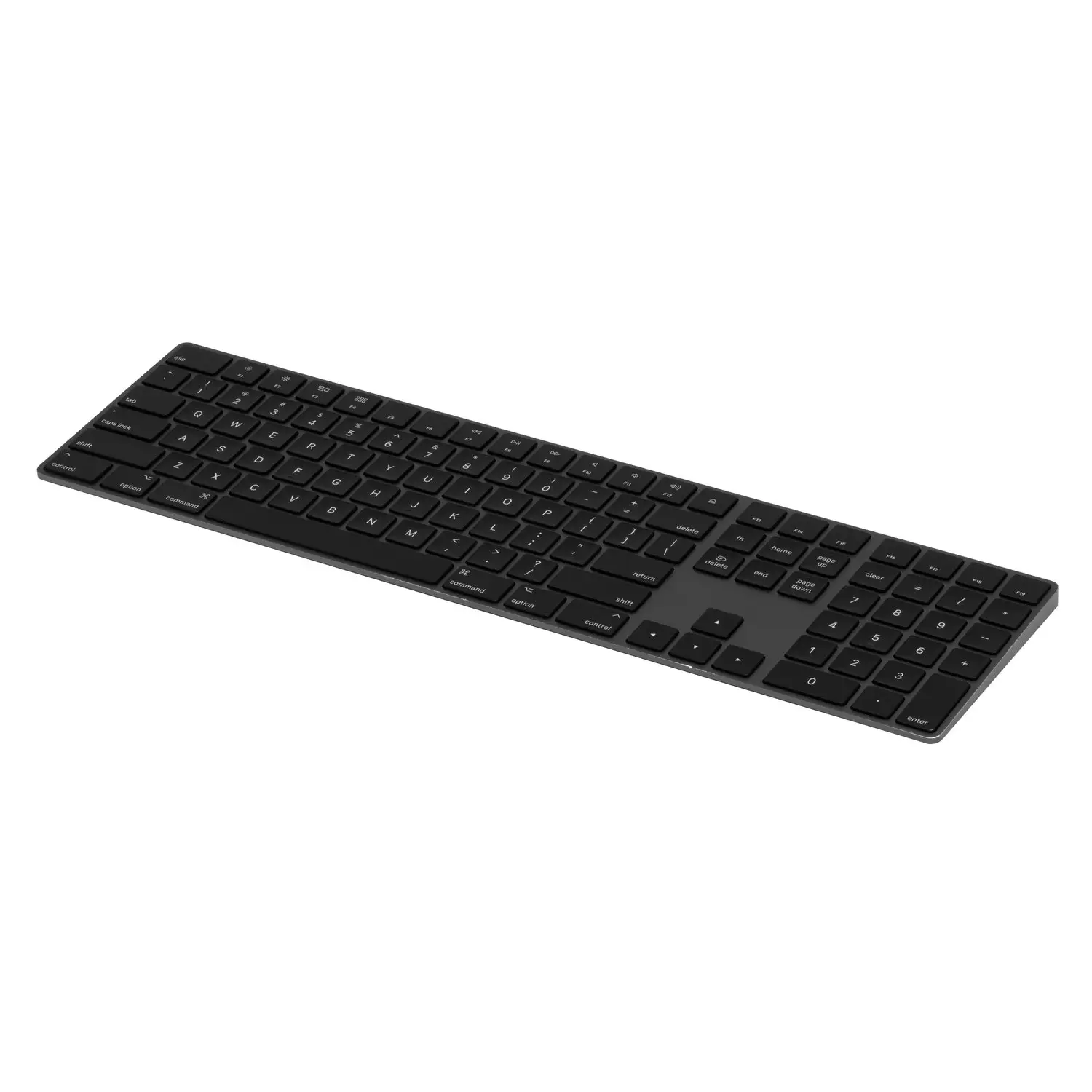
Quick Verdict: Conditional — best suited for stationary Mac users who value aesthetics, Touch ID convenience, and Apple ecosystem synergy, but less ideal for portable use or mixed‑OS environments.
| Pros | Cons |
|---|---|
| Sleek, premium design that matches Apple gear | Expensive compared to similar non‑Apple keyboards |
| Touch ID integration for quick authentication | No backlighting, limiting low‑light usability |
| Comfortable, precise typing feel | Black keys show finger oils and wear over time |
| Long battery life (2–4 weeks per charge) | Wider layout can cause ergonomic strain with mouse use |
| Easy Bluetooth pairing with Apple silicon Macs | New USB‑C models require macOS 15.1 for full functionality |
| Numeric keypad boosts productivity | No risers for angle adjustment |
Claims vs Reality
Apple’s marketing pushes the “remarkably comfortable and precise typing experience”. Across Best Buy and Trustpilot, users back this up: “Typing is accurate and silent…worth just shelling out for this one” said a Best Buy reviewer who replaced a problematic third‑party keyboard. The scissor‑switch mechanism is consistently praised for balanced key travel, making it suitable for extended writing sessions.
Battery life claims of “about a month or more” are slightly optimistic. While some report going weeks without charging, a verified Trustpilot user noted charging “every week and a half to two weeks, depending on usage.” Heavy typists, especially in creative fields, may not hit Apple’s upper range.
Apple promises “instant pairing” with Macs running macOS 11.4 or later. This is true for Lightning‑port models, but Twitter and Apple Community reports show that the new USB‑C variant “requires upgrading to macOS Sequoia 15.1” for Touch ID and function keys to behave correctly. Users on Sonoma and Ventura have experienced mismapped media keys and non‑functional fingerprint prompts, creating frustration in managed enterprise environments.
Cross‑Platform Consensus
Universally Praised
Touch ID emerges as the most valued feature. A Quora reviewer scored it “10/10” for convenience, with multiple Best Buy customers calling it “perfect when using my Mac in clam shell mode.” For professionals handling sensitive data, the ability to unlock and approve purchases without a password is a productivity boost.
Design aesthetics are another strong point. Many buyers match the black keys to space gray Macs or dark‑themed setups. A Best Buy customer admitted it was “an OCD purchase” to fit their man cave aesthetic, while Reddit user u/[name omitted] said “black looks amazing” after switching from white keys.
Typing feel also draws consistent praise. Verified buyers highlight “comfortable key travel and tactile feedback,” with the numeric keypad making spreadsheet work faster. For accountants and data entry roles, this extended layout is essential.
Common Complaints
The black keycaps are visually striking but prone to wear. Reddit user u/[name omitted] warned, “The S and C key have the black paint chipping off… Apple has this problem with a lot of their black keyboards.” Oils from fingers are also more visible, leading to a “grubby” look over time.
Ergonomics are problematic for some. The full‑width design stretches the mouse hand farther right, causing shoulder discomfort for right‑handed users. One Reddit commenter noted, “Your mouse arm will be stretched way out,” making it less ideal for compact desk setups.
Portability is another weak spot. The keyboard is “longer than your MacBook and extremely uncomfortable to carry around” according to Reddit feedback. This aligns with its intended stationary use, but mobile professionals should beware.
Divisive Features
Battery life perceptions vary. While Trustpilot and Best Buy reviews praise longevity, Reddit reports suggest heavy use will shorten intervals between charges. For casual home use, Apple’s claim holds; for high‑volume typists, expect more frequent charging.
The lack of backlighting splits opinion. Some Best Buy reviewers didn’t mind due to office lighting, but others called it “a drawback for those who often work in low‑light environments.” Gamers and late‑night coders may prefer alternatives with illuminated keys.
Trust & Reliability
Long‑term durability is mixed. The build quality itself is “outstanding, durable, and well‑constructed” per Trustpilot, but cosmetic wear on black keys is a recurring Reddit complaint after 1–2 years. Apple’s refusal to offer easy keycap replacements frustrates owners.
Reliability in connectivity is strong for Lightning models, with Best Buy users reporting “no lag” and “flawless Bluetooth pairing.” However, for the new USB‑C model, OS compatibility is a trust issue. Apple Community threads show enterprise buyers stuck on older macOS versions unable to access Touch ID or media key functions—something Apple has not patched for non‑Sequoia users.
Alternatives
The Reddit thread mentions considering the Logitech MX Mechanical in full size. It lacks Touch ID but offers backlighting, potentially resolving low‑light complaints. It also has a different ergonomic profile that may suit desk setups where mouse reach is a concern.
For users who don’t need numeric input, the smaller Magic Keyboard variants reduce width and improve portability. However, they sacrifice the keypad’s productivity benefits.
Price & Value
Current retail pricing ranges from $189.99 on Amazon to $249 on Apple’s education store. eBay resale values for used units hover between $75–$91 for black key models, indicating strong retention compared to other peripherals.
Best Buy buyers justify the expense for productivity gains: “It was worth the expense…no lag, no pinched nerves.” Still, Trustpilot cautions it’s “considered expensive” and alternatives may offer more features (like backlighting) for less.
FAQ
Q: Does Touch ID work on Intel Macs?
A: No. Touch ID requires a Mac with Apple silicon (M1, M2, M3, etc.) running at least macOS 11.4, or macOS 15.1 for the USB‑C model.
Q: How long does the battery last?
A: Light users report up to a month per charge, but heavy typists often recharge every 1.5–2 weeks.
Q: Can the black key paint wear off?
A: Yes. Multiple Reddit users report chipping and visible oils after extended use.
Q: Is the keyboard backlit?
A: No. The absence of backlighting is a common drawback for low‑light usage.
Q: Will it work on macOS Sonoma with USB‑C?
A: Partial functionality only. Touch ID and some function keys may not work without macOS Sequoia 15.1.
Final Verdict: Buy if you’re a stationary Mac user who values aesthetics, Touch ID, and Apple ecosystem integration. Avoid if you need portability, backlighting, or work in a mixed‑OS environment. Pro tip from the community: match your key color to your setup, but be prepared for visible wear on black keys—consider a protective cover if appearance matters.