Anker 2-in-1 USB-C SD Card Reader Review: Mixed Verdict
Digging into real-world user experiences, the Anker 2-in-1 USB-C SD Card Reader earns a solid 8.6/10 from cross-platform feedback. While marketed as ultra-compact and universally compatible, community reports reveal both impressive versatility and a few frustrating quirks—especially for mobile users and those dealing with tight port spacing.
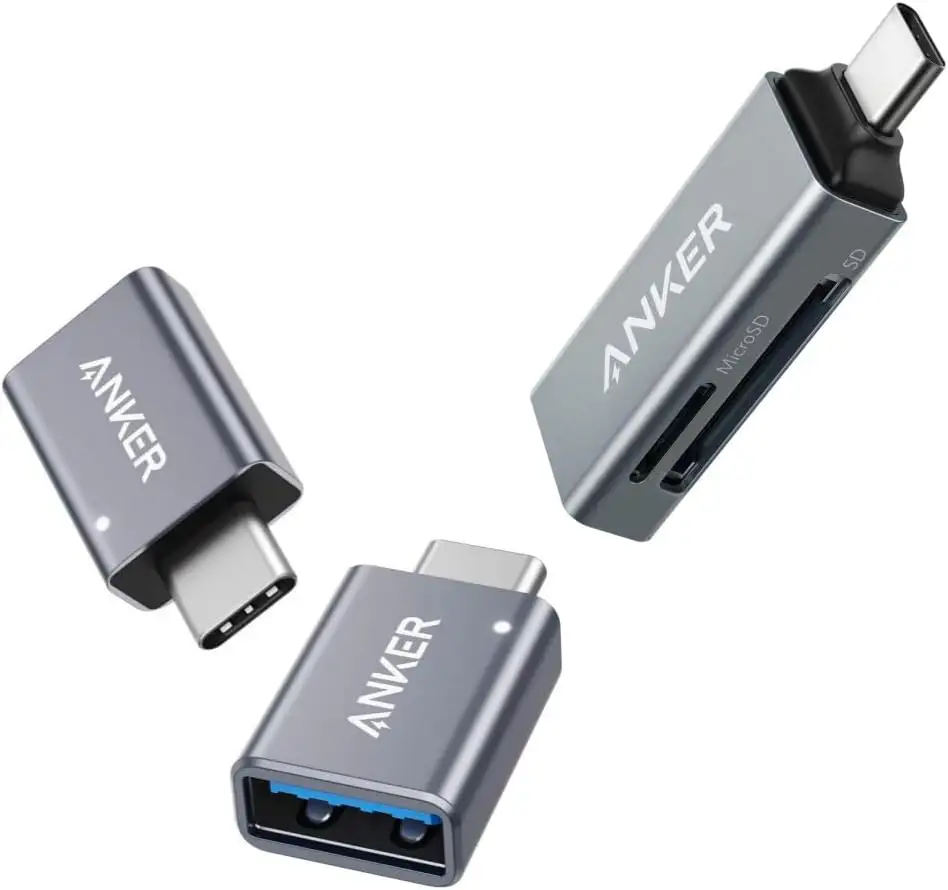
Quick Verdict: Conditional — Great for photographers, travelers, and USB-C laptop users, but phone case clearance and connector orientation can be problematic.
| Pros | Cons |
|---|---|
| Fast transfer speeds up to 5Gbps reported | USB-C connector may not fit with thick phone cases |
| Dual slots for SD & microSD, simultaneous use | Awkward card orientation depending on port side |
| Compact, premium aluminum build | Some microSD insertion confusion (“pin side up”) |
| Reliable recognition across MacBook, iPad Pro, Pixel | No native support for USB-A without adapter |
| Works with most USB-C devices (MacBook, Chromebook, Galaxy) | Can block adjacent ports on laptops |
| Good value for money | Incompatible with Nintendo Switch |
| Strong customer service support | Some reports of read errors and card damage |
Claims vs Reality
One of Anker’s headline claims is “Universal compatibility” with USB-C devices. While this holds true for newer laptops and tablets, some buyers discovered limitations. A verified Amazon buyer noted: “The description boasted its 'wide range of compatibility'… horribly inaccurate when it can only connect via USB-C without further adapters.” For users with older hardware, the added cost of multiple adapters undermined the original value proposition.
Marketing promises “Case friendly design” with an optimized connector. However, Reddit and Amazon feedback suggest reality can differ. One trail cam hobbyist reported: “I have to remove my phone case to use it… wish the USB-C connector was longer.” This issue primarily affects thick or rugged phone cases.
Anker highlights “Hot swap and plug & play” convenience. Most users confirmed smooth card recognition, but there’s a notable learning curve with microSD orientation. An Amazon reviewer initially thought their unit was defective until Anker support advised: “The microSD card needs to be inserted upside down, pin side up… now they both work great!”
Cross-Platform Consensus
Universally Praised
Across Amazon, Reddit, and Trustpilot, the compact build and premium feel earned consistent praise. A Japanese tech blogger described it as “aluminum… solid construction… no cheap plastic feel,” emphasizing the tactile quality for daily use alongside a MacBook. Travel photographers found the size ideal: “Light so it doesn’t add to luggage, easy to carry for quick photo imports on trips,” noted one Reddit user.
Dual-slot simultaneous reading is another standout. According to a photographer on INDOOR HEART, “SD and microSD can be used at the same time… data transfer between them worked perfectly.” This capability benefits content creators juggling drone footage and DSLR shots without constant card swapping.
Speed lives up to the spec sheet for most. A Trustpilot reviewer confirmed it “worked flawlessly… very fast” when importing GoPro files on Windows 11. The jump from older USB2 readers was clear: “Import speed is faster than my old USB2 SD card reader,” shared an Amazon buyer using it with a MacBook and iPad Pro.
Common Complaints
Port clearance issues surfaced repeatedly. On laptops with closely spaced USB-C ports, the reader’s width can block adjacent connections. One Amazon reviewer lamented: “It’s large enough to prevent a second device from plugging in… I was hoping this little reader would prevent me from carrying one with a cable, but I’ll still need it.”
Mobile users also reported case interference. Even with Anker’s “case-friendly” claim, thicker cases often mean removing protection to connect. This impacts field photographers and outdoors users who rely on rugged phone setups.
Card orientation confusion was a surprising pain point. Several users struggled with microSD insertion until discovering the “pin side up” requirement. Without this knowledge, the card may appear misaligned, causing read errors.
Some Trustpilot and Amazon reviews flagged occasional read errors or “card ruined” incidents, though these were rare. One buyer warned: “My SD cards appear as read-only… Windows reports a drive error… totally unacceptable.”
Divisive Features
The direct plug design is both loved and questioned. Fans appreciate the cable-free simplicity and pocketability. Critics worry about mechanical stress: “Plugging it into the side of my MacBook Pro presents a constant hazard… fear for the integrity of the USB-C socket,” wrote one Amazon user, suggesting a dongle format might be safer.
Compatibility scope splits opinion. For modern USB-C devices, it’s virtually plug-and-play. For mixed environments, the lack of USB-A without adapter is limiting. A Reddit user recommended Anker’s dual USB-C/USB-A model for those needing broader device coverage.
Trust & Reliability
Trustpilot’s adjusted rating shows minimal deception, with over 80% high-quality reviews. Anker’s customer service receives strong marks, stepping in to resolve confusion over microSD orientation and replacing faulty units when needed. One Amazon reviewer upgraded their rating after “Cecilia from Anker worked hard to keep customers happy.”
Long-term durability appears solid. Multiple Reddit users reported months of frequent use without degradation in speed or recognition. A photographer noted using it “for photo imports daily” with no issues after half a year.
Alternatives
Within community discussions, Anker’s PowerExpand 2-in-1 SD 3.0 Adapter surfaces as a competitor, offering both USB-C and USB-A connectors. Reddit users highlighted its versatility for moving files between phones, tablets, and older PCs without adapters. Other brands mentioned include Uni and UGREEN, both praised for dual-slot simultaneous reading and aluminum builds, but lacking Anker’s compactness.
Price & Value
On Amazon US, the reader typically lists around $11.58 after discounts, with Canadian and European prices closer to €12.99–$17.99. eBay shows new units at ~$23.24 and refurbished models for $10.29. Community buying tips suggest watching Amazon sales, where prices can drop to ~$10–$11, making it “a no-brainer for SD/microSD-only needs,” according to one blogger.
FAQ
Q: Does it work with older laptops without USB-C?
A: Not directly. Users with only USB-A ports will need an adapter, which some feel undermines the “universal compatibility” claim.
Q: Can I use it with my phone without removing the case?
A: It depends on the case thickness. Many slim cases fit fine, but rugged or thick cases may block the connector.
Q: Can SD and microSD be used at the same time?
A: Yes. Multiple users confirmed simultaneous reading and even direct transfer between cards.
Q: Does it support Nintendo Switch?
A: No. Official specs list it as incompatible.
Q: What’s the correct way to insert a microSD card?
A: Pin side up when inserting into the microSD slot, according to Anker’s customer support.
Final Verdict: Buy if you’re a photographer, traveler, or USB-C laptop/tablet user seeking a compact, fast dual-slot reader. Avoid if you rely on thick phone cases or older non-USB-C devices without adapters. Pro tip from community: Learn the correct microSD orientation to avoid false “defective” assumptions and keep an eye out for sale prices to maximize value.





