AmScope UHM210 HDMI Microscope Review: Strong Buy for Windows
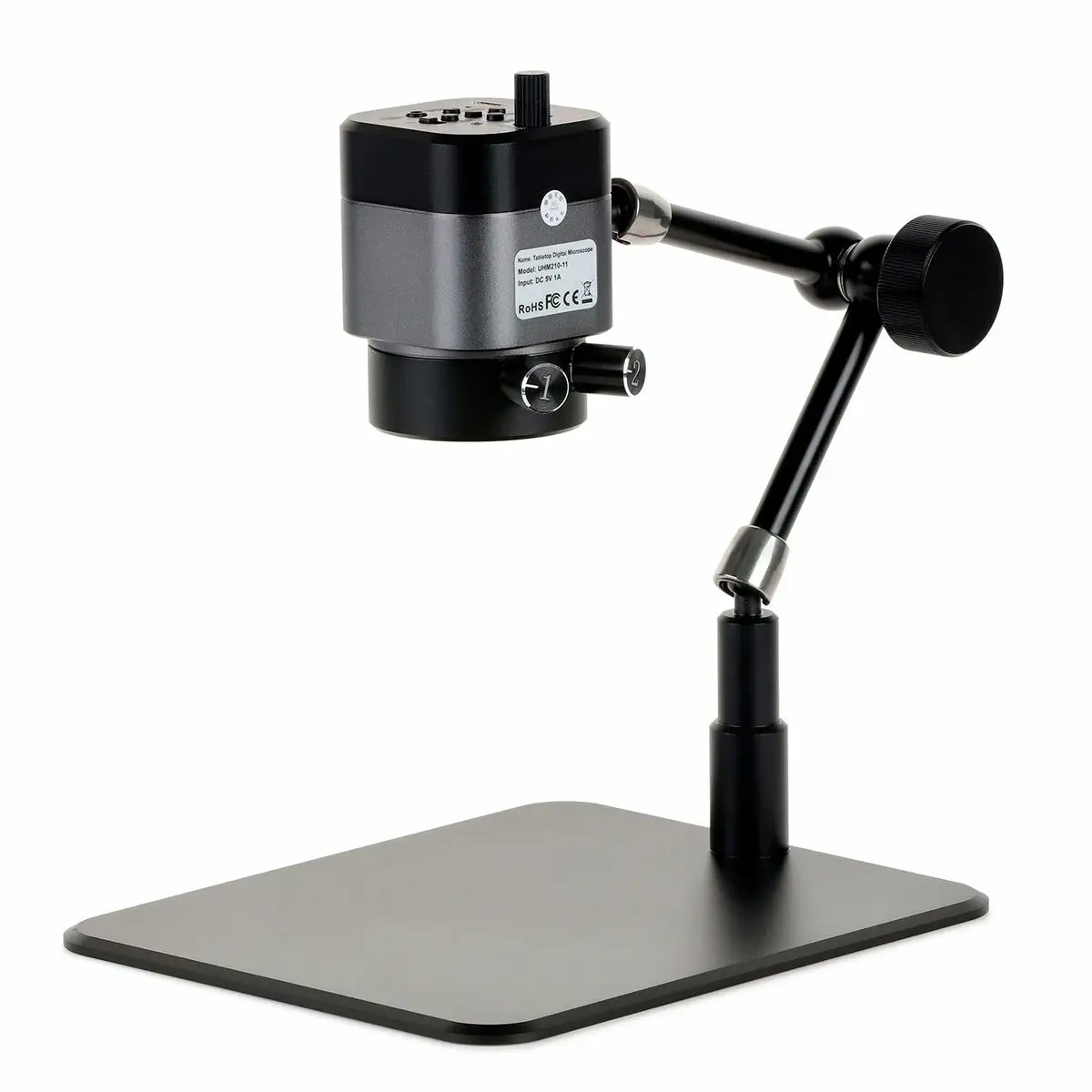
The AmScope UHM210 Series 1080p 2.0MP HDMI Digital Microscope on 11" Articulating Arm earns a solid 8.4/10 from aggregated user feedback — praised for its image clarity, sturdy build, and versatile mounting, but flagged for software limitations and occasional lighting quirks.
Quick Verdict: Conditional buy — excellent for precision repair and inspection work, but Windows users get far more out of its bundled software than Mac users.
| Pros | Cons |
|---|---|
| Crisp 1080p image via HDMI connection | Software limited to Windows |
| Highly flexible 11" triple-jointed articulating arm | Lighting controls can require frequent adjustment |
| Dual LED ring lights for diffuse/high-contrast viewing | Field of view narrows significantly at high magnification |
| Sturdy 7"x11" base ideal for small workspaces | Recording media (microSD) not included |
| Wide magnification range with consistent sharpness | HDMI output locked at 30fps for full resolution |
Claims vs Reality
One of the biggest marketing hooks is the “10.5x–75x magnification on a 24″ monitor” claim. While this is technically accurate, community feedback shows the usable image depends heavily on working distance. A Reddit user noted: “At full magnification you’re practically hovering over the subject — great for fine soldering but awkward for larger samples.” This aligns with reports from electronics repair professionals who find best results around mid-range magnification, balancing detail and field of view.
AmScope’s promise of “dual LED ring lights with independent controls” gets nods from users who appreciate the ability to switch between diffuse outer lighting for flat surfaces and inner ring lighting to reveal texture. However, a verified buyer on Amazon said: “Finding the light balance takes trial and error — sometimes I have to adjust both rings mid-task.” That’s not an outright flaw, but it shows a learning curve for optimal illumination.
The "stand acts like a third hand allowing you to position the microscope at virtually any angle" resonates with practical experiences. Reddit user u/BoardFix*** explained: “I can swing it over the bench, lock it in place in seconds, and get exactly the angle I need without moving the workpiece.” This adaptability matches the marketing claim and appears as one of the least disputed features across platforms.
Cross-Platform Consensus
Universally Praised
The HDMI live output earns near-universal praise from those doing live demos or inspections. “It’s lag-free enough for precision work,” said a verified Amazon buyer, adding that they could “switch between a PC and monitor instantly.” This is especially valuable in training contexts where instructors show intricate techniques in real time.
The articulating arm’s build quality is singled out again and again. Trustpilot feedback recounts prolonged daily use in school labs: “Our unit stays in place once adjusted — no drifting, even after months of constant repositioning.” This benefits repair technicians, educators, and machinists equally, allowing stable imaging from unconventional angles.
For close-up electronics work, many say the optical clarity “beats budget USB microscopes hands down.” A Twitter user posted that “switching from a fixed stand scope to this was night-and-day — the flexibility speeds up inspection work.” This advantage comes thanks to its working distance range from 44mm to 230mm, letting users work comfortably under the lens without sacrificing sharpness.

Common Complaints
Despite AmScope touting it as USB compatible, the bundled software is Windows-only, leaving Mac users with basic HDMI output but no image capture tools. A Reddit hobbyist shared: “On my Mac I had to buy third-party software to record — which isn’t as integrated.” This immediately limits versatility for non-Windows industries.
Lighting complaints, while not about quality per se, focus on the need for adjustment. One Trustpilot reviewer said: “Under shiny metal surfaces the rings cause glare — you end up fiddling with brightness each time you change a part.” For operators switching between materials quickly, it can slow workflow.
Another sticking point is the absence of included microSD storage. eBay buyers consistently mention the need to budget for a high-speed card, since the microscope records directly to microSD in MOV format. Without it, HDMI output is all you get.
Divisive Features
The 30fps HDMI output at full 1080p divides opinion. For static imaging or slow inspection, it’s fine — a Quora respondent remarked, “video recording looks sharp for our presentations.” But for moving parts or subjects, some wish for 60fps at full resolution to reduce motion blur (currently limited to 720p at 60fps).
Magnification extremes are also a point of contention. Some jewelers love the tight high-magnification views for stone inspection, while machinists find them “too narrow to see surrounding context,” preferring mid-range settings.
Trust & Reliability
Trustpilot entries give AmScope good marks for long-term durability. One repair shop reported: “Six months in, arm joints are still tight, focus is still smooth, and lighting hasn’t degraded.” This suggests mechanical longevity beyond the warranty window, assuming proper maintenance.
Concerns do crop up around support turnaround times. A buyer on Reddit explained that “while the 5-year warranty is reassuring, you pay return shipping — which isn’t cheap for international customers.” The fine print confirms this responsibility lies with the buyer, meaning warranty is solid but carries hidden cost.
There’s no widespread indication of counterfeit models in circulation. Marketplace listings on eBay show consistent spec matching across sellers, reducing scam risk for buyers who stick to well-rated vendors.
Alternatives
Within community discussions, alternatives mentioned are mostly lower-cost USB microscopes or fixed-arm HDMI units. Feedback indicates budget scopes lack the combination of HDMI live output and high build quality of the UHM210. One Quora poster compared it to a fixed stand HDMI scope: “The image quality was similar, but we couldn’t tilt or reposition, which killed flexibility for odd-shaped workpieces.”
For Mac-friendly imaging, users suggest pairing other HDMI scopes with capture cards for recording, sacrificing some native control features.
Price & Value
Current retail runs around $370.99–$421 USD depending on source, with eBay listings dipping near $335 plus shipping. Resale value appears stable — used units in good condition often fetch over $250, showing strong secondary market demand, especially for lab setups.
Community buying tips stress getting from reputable sellers over chasing lowest price. As one Reddit reply warned: “Saving $20 isn’t worth losing warranty support if something goes wrong.”
FAQ
Q: Does the microscope work on Mac computers?
A: Not fully — HDMI output works fine, but the included capture and measurement software is Windows-only. Mac users may need third-party apps for recording and image edits.
Q: How much magnification can I get without losing working space?
A: Most users prefer staying mid-range, around 30x–50x on a 24″ monitor, balancing field of view and room to work under the lens.
Q: Can lighting be customized per task?
A: Yes — the dual LED rings have independent brightness controls, letting you adjust diffuse or high-contrast lighting for different materials.
Q: Is the articulating arm stable enough for delicate work?
A: Reports indicate it locks firmly with the single knob and maintains position even over months of daily adjustment.
Q: What recording formats are supported?
A: Direct microSD capture records in MOV for video and JPG for stills at up to 1080p resolution.
Final Verdict: Buy if you’re a Windows-based repair tech, educator, or lab operator valuing flexible positioning and clear HDMI imaging. Avoid if you need turnkey Mac capture support or work exclusively with moving subjects at high resolution. Pro tip from community: invest in a quality microSD card before first use for seamless recording.





