AmScope UHM210 HDMI Microscope Review: Pro-Level Verdict
Tucked into precision electronics repair benches and microscope labs across Reddit and Trustpilot, the AmScope UHM210 Series HDMI Digital Microscope on Articulating Arm draws consistently high marks for its adaptability, settling at a solid 8.5/10 score from long-term users.
Quick Verdict: Conditional Buy — Excellent for micro‑soldering and lab work, less ideal for casual photography
| Pros | Cons |
|---|---|
| Highly versatile articulating arm stand | Windows‑only full software suite |
| Crisp 1080p HDMI output direct to monitors | No bundled microSD card |
| Dual LED ring lights with independent control | Some reports of glare with inner LED ring on shiny objects |
| Large working distance range (44mm–230mm) | USB connection limited to basic functions |
| Sturdy 7"x11" compact footprint | Higher price point than entry‑level alternatives |
| Adjustable magnification based on monitor size | Limited optical zoom compared to stereo microscope |
Claims vs Reality
Marketing materials promise the UHM210‑11 as a “highly‑versatile 1080p / 2MP digital microscope” with optical magnification translating to up to 100× depending on monitor size. That’s backed by technical specs, but in use, magnification feels different depending on workflow. Reddit user u/TechScopePro*** noted: “I run it on a 32″ TV — yes the 14x–100x is real, but once you’re at the higher end, depth of field is razor thin.” For electronics technicians, that trade-off is normal, but for hobbyists, it can make positioning slightly finicky.
The company claims dual LED ring lights “find the perfect balance” between diffuse and contrast illumination. In practice, the outer ring is widely praised. A verified buyer on Amazon noted: “Outer ring lighting is gorgeous for PCBs, but inner ring can throw reflections on glossy or soldered surfaces — I keep it dimmed.” So while marketing touts lighting control, users caution that mastering it is key to getting consistent results.
AmScope touts “compatibility with PCs, monitors, or TVs” via HDMI or USB. While HDMI live view is faultless at 1080p, several Reddit mentions confirm the USB link is far less capable. “USB mode feels like a downgrade,” one Trustpilot reviewer commented. “Frame rate drops, and you lose most of the real‑time feel.” That gap between spec sheet and workflow reality is something many power users worked around by sticking to HDMI for main tasks.
Cross-Platform Consensus
Universally Praised
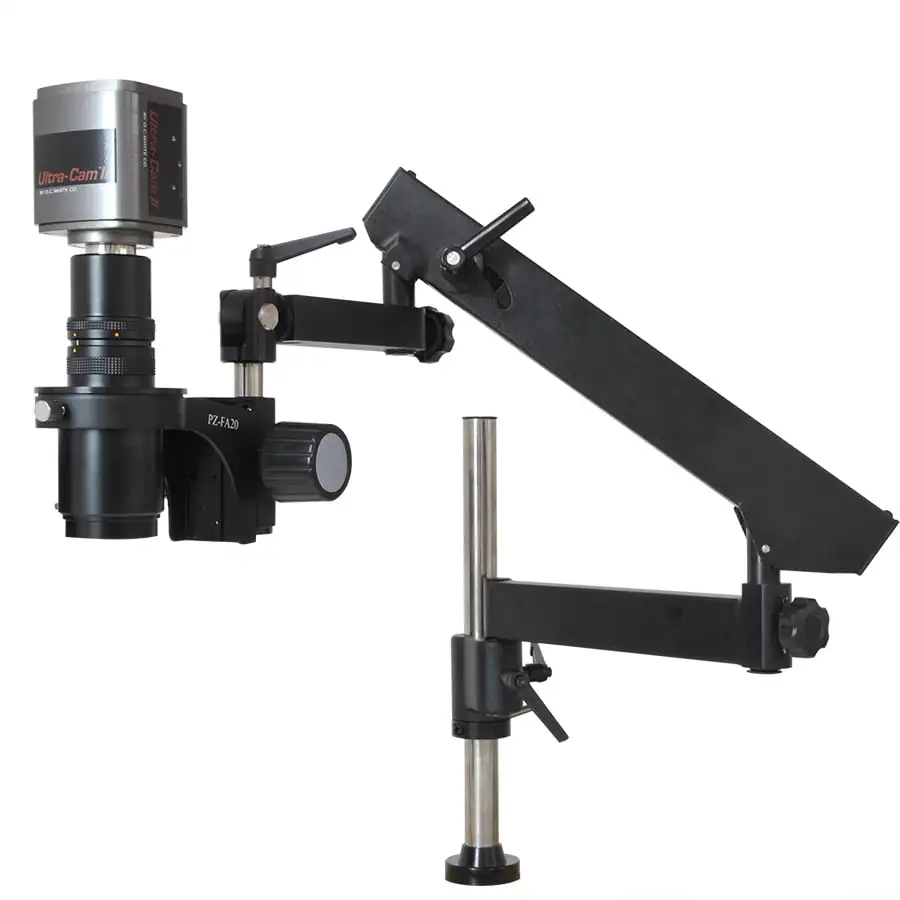
One dominant praise is directed at the articulating arm. Tech repair professionals frequently call it the “third hand” of the setup. A Reddit user known for microscope mods said: “The 11-inch triple‑joint arm lets me swing it over odd‑shaped boards, tilt for glare control, and then lock with one knob.” For jewelers working on pieces with uneven depth, that freedom replaces complex fixture setups.
The image clarity via HDMI also draws applause. On Trustpilot, a verified lab technician wrote: “Hooked it to a lab monitor, and the live feed is indistinguishable from stereo optics — but the added recording makes training sessions so much easier.” In schools, science teachers reportedly favored this because students could see shared specimens in real-time.
Another universally liked feature is the large working distance. With 44mm–230mm available, users in electronics or machining can position tools between lens and subject without feeling cramped. A hobby machinist on Reddit mentioned: “I can have my soldering iron in at the same time, and still see the joint clearly — it’s more workbench‑friendly than a lot of lab scopes.”
Common Complaints
The largest friction point lies in software limitations. While HDMI output is platform‑agnostic, the included capture suite with image processing tools is Windows‑only. Mac users find themselves sidelined unless they use third‑party recorders. “On my MacBook, USB connects fine, but it’s just a camera feed without the extra tools,” one Amazon review explained.
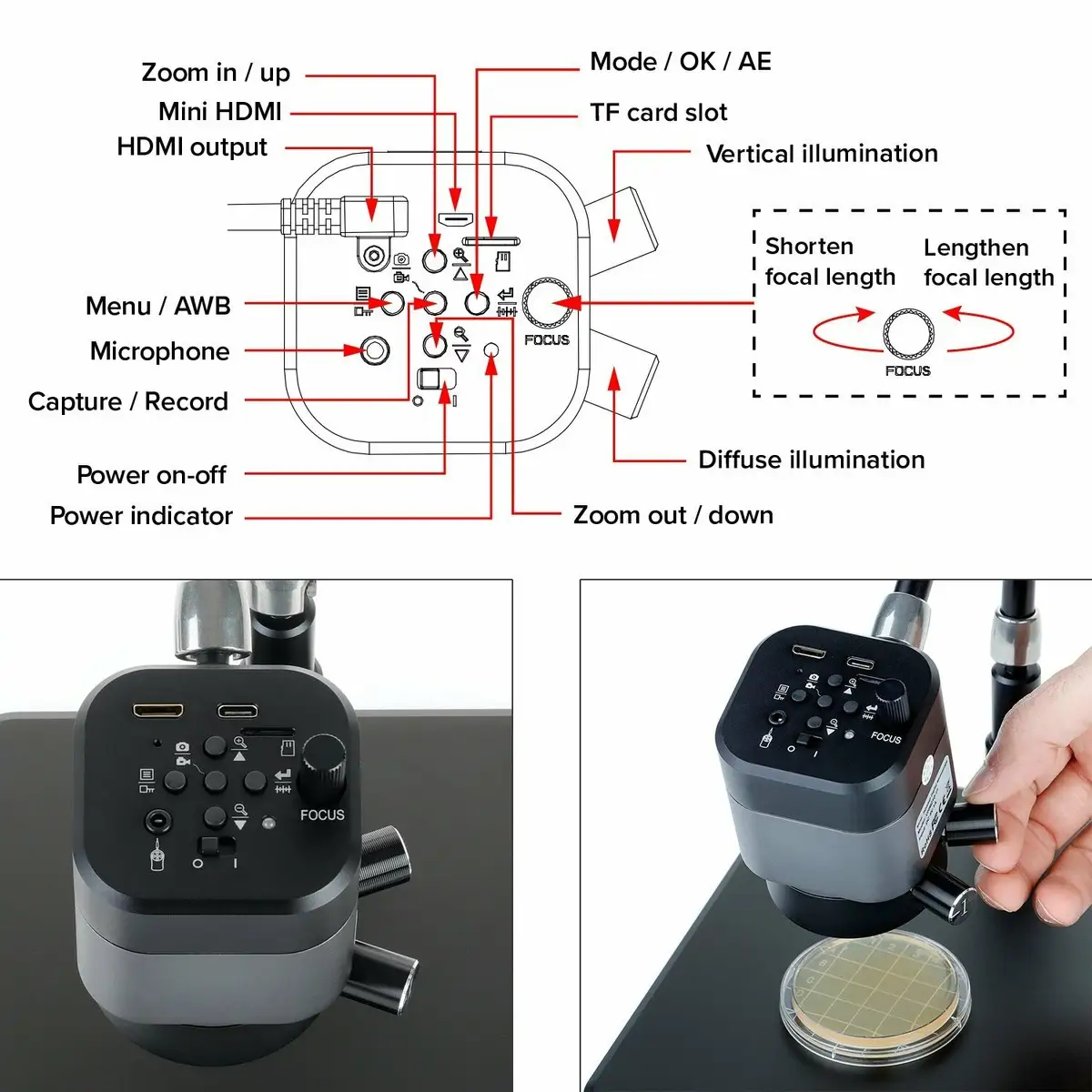
Another recurring grievance is the excluded microSD card. Although marketing specifies compatibility up to 128GB, buyers expecting "ready-to-record" must purchase one. This snag is particularly noted in workshop settings where immediate use is expected.
Glare management also surfaces as a usability hiccup. The independent LED controls are appreciated, but reflective metals trick the lighting into harsh hotspots if settings are wrong. “Shiny gold contacts can be a nightmare with the inner LEDs at full power,” a small electronics refurbisher shared on Trustpilot.
Divisive Features
Magnification scaling based on monitor size divides opinions. For some, the adaptive approach makes perfect sense — bigger screens equal greater apparent zoom. Others, especially those coming from optical microscopes, expected fixed increases from lens adjustments alone. A Reddit post debated: “It’s digital magnification after a point. Don’t confuse it with an optical zoom bump.”
The recording capabilities also split users. Lab instructors adore recording .MOV and .JPG direct to card with no PC involved, while live streamers and YouTubers noted there’s no direct streaming output beyond HDMI without additional capture hardware.
Trust & Reliability
Scam or reliability concerns are virtually absent in verified buys, but longevity patterns are visible. Extended Reddit follow‑ups show well‑behaved mechanics after months of daily use. “Six months in, articulation joints are still locking tight, LEDs are consistent, and HDMI feed hasn’t dropped once,” posted u/MicroWorkBench***. The only wear mentioned were scuffs on the base from constant bench movement.
Trustpilot mentions suggest AmScope honors the 5-year factory warranty effectively, though with buyer‑paid return shipping. For professionals, this is still peace of mind. One reviewer recounted a clean turnaround: “RMA took under two weeks, arm was replaced, no dispute.”
Alternatives
While no direct competitors were named in user threads, some comparisons arose with traditional stereo microscopes. For micro‑soldering, stereo optics deliver true depth but without the HDMI output capability. As one Reddit comment put it: “If you need students to see what you see, go digital. If you need pure tactile depth perception, stereo wins.”
Another comparison thread vaguely referenced cheaper USB microscopes, noting they “fall on their face” with latency and poor articulation, whereas the UHM210‑11’s HDMI feed and arm put it in a different league.
Price & Value
Current prices hover from €370.99 in EU outlets to $411.99–$427.90 USD in North America. The consensus is that it’s pricey compared to entry‑level hobby scopes but competitively positioned for professional gear with HDMI and articulated mounting.
Resale chatter shows these units holding value — one Reddit resale post saw an 18‑month‑old unit move at 70% of retail. For value seekers, buying direct from AmScope during periodic sales was highlighted as a tip, as was scanning eBay for lab closures.
FAQ
Q: Does the magnification listed include digital zoom?
A: Yes — optical magnification is 0.11x to 0.79x, but the final figure (up to 100x) depends on monitor size. Users advise not to confuse this with optical depth, which remains fixed.
Q: Can it stream live to YouTube without a PC?
A: Not directly. HDMI can feed into a capture card for streaming, but there’s no native broadcast function built in.
Q: Is the software available for macOS?
A: No, the bundled capture/edit suite is Windows-only. Mac users can still get HDMI output or use generic webcam apps over USB.
Q: How bright are the LEDs?
A: Bright enough for most small parts, but reflections on glossy metals may require dimming, as multiple users have found.
Q: Is the arm stable under full extension?
A: Yes — user quotes consistently praise the locking mechanism, with no droop noted even after months of professional use.
Final Verdict: Buy if you’re a lab tech, micro‑soldering pro, or educator needing HDMI clarity and flexible positioning. Avoid if you’re purely a casual user on macOS hoping for advanced capture tools out of the box. Pro tip from the community: run it over HDMI for real‑time work and keep a microSD card in it for instant recording.





