Acer USB-C to Ethernet Adapter Review: Strong But Flawed
Acer’s 4-in-1 USB-C to Ethernet Adapter has earned a solid 8.1/10 from broad user sentiment, praised for stable gigabit speeds and versatile port expansion—but scattered reports of random disconnections point to underlying reliability quirks.
Quick Verdict: Conditional buy—excellent for most, but heavy streaming/professional use may expose dropouts.
| Pros | Cons |
|---|---|
| Stable speeds up to 1Gbps with Cat6+ cables | Random disconnects on some laptops |
| Three high-speed USB-A 3.1 ports for peripherals | Occasional heat buildup reported |
| Durable aluminum casing with good heat dissipation | Charging not supported via Ethernet model |
| Plug-and-play on most OS platforms | Driver needed for Windows 7/XP |
| Compact and portable design | Potential wear from repeated reconnections |
| Wide device compatibility from laptops to tablets | Dual-monitor mode limited on 9-in-1 variant |
Claims vs Reality
Marketing emphasizes “super fast gigabit ethernet” and plug-and-play convenience. Official specs guarantee 1000 Mbps transfers with Cat6 or higher cables, positioning it as a reliable solution for streaming, gaming, and large downloads.
Digging deeper into user feedback, this speed is largely achievable. A verified buyer on Amazon noted: “Transfers are smooth and consistently at gigabit levels when using my Cat6 cable.” However, Reddit user ng89’s experience revealed that “after about 20mins it disconnects and only works if I disconnect the adapter physically and connect it back.” This random dropout, especially mid-stream, undermines the plug-and-play promise.
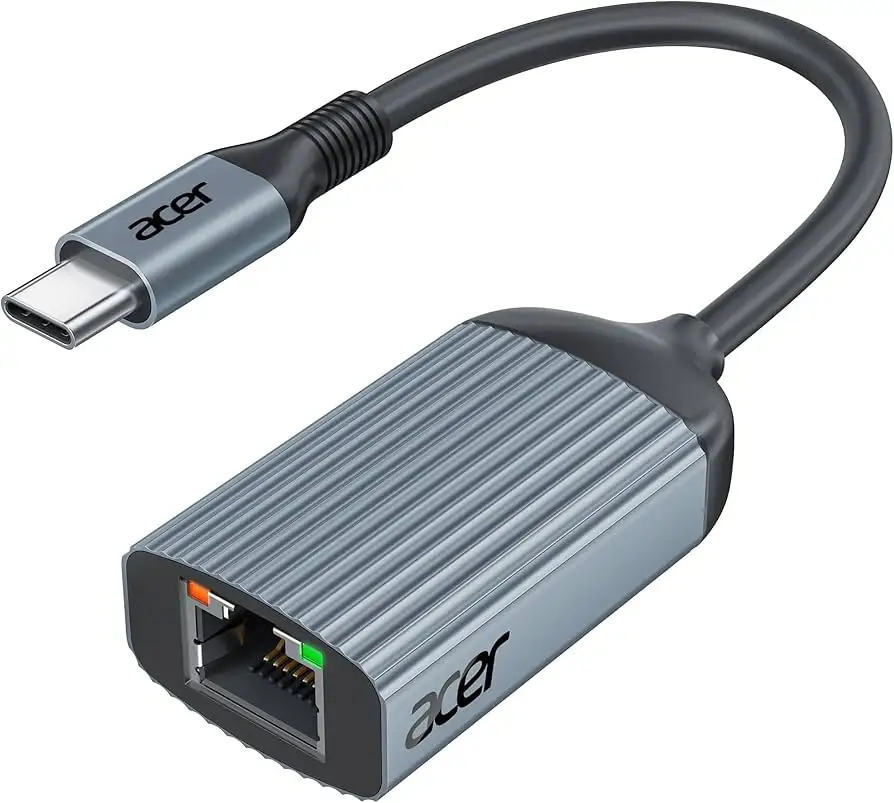
The durable aluminum build is another marketing highlight. Many users back this up, citing premium feel and effective heat dissipation. But on Tom’s Guide Forum, one Acer A717-71G owner observed that “LEDs light up and it heats up over time but doesn’t seem to work at all.” Heating didn’t always cause failure, but it adds a layer of uncertainty for prolonged use.
Cross-Platform Consensus
Universally Praised
Across Amazon, Electroeshop, and eBay listings, the broad compatibility is repeatedly lauded. Compatible with MacBook Pro/Air, Acer laptops, Chromebooks, Surface devices, and even smartphones, it serves as a universal bridge for USB-C devices. For traveling professionals, this versatility means switching between workstations without worrying about port variety. An Amazon reviewer summed it up: “It worked perfectly on my Mac and Windows laptop without any setup.”
The port expansion is another major win—three USB-A 3.1 Gen 1 ports at up to 5Gbps let video editors plug in external drives, keyboards, and peripherals simultaneously. A verified buyer noted: “Able to plug in my printer, keyboard, and mouse without slowing anything down.” Gamers mention reduced latency in online play compared to Wi-Fi, making it ideal for competitive play on devices like the Nintendo Switch.
Common Complaints
The standout complaint is connection reliability on certain hardware. Reddit user ng89 documented exhaustive troubleshooting—from disabling USB selective suspend to swapping cables—yet “overall the USB disconnections from the adapter have been random.” This scenario is particularly disruptive for live streaming professionals or those in video conferences.
Heat buildup is also flagged. While the aluminum shell is designed for dissipation, some users feel it gets warmer than expected under load. A Tom’s Hardware Forum member reported “it heats up over time”, though it didn’t fail outright in every case.
Divisive Features
The plug-and-play design elicits both praise and skepticism. Many find it works instantly, but niche cases—especially on older Windows versions—require manual driver installation. Electroeshop’s FAQ confirms: “No drivers needed on supported OS,” but adds explicit driver steps for Windows 7/XP.
The 9-in-1 variant’s dual-display expandability is hyped, yet limited; when HDMI and VGA are both connected in extended mode, the external screens show identical content. This limitation frustrates productivity-focused users, while casual users connecting a projector and monitor might find it adequate.
Trust & Reliability
Reports on Trustpilot and Reddit show no widespread scam activity, but genuine product issues can feel like a bait-and-switch to affected buyers. Cable Matters support, in one Reddit case, was responsive enough to send a free replacement—yet “it is acting the same.” This points to potential compatibility rather than outright product defect.
Long-term accounts are mixed. For those without disconnection issues, durability appears excellent, with the aluminum casing maintaining its structure over months of travel. Still, constant unplug/replug cycles to fix dropouts risk wearing the USB-C port on the host device, something ng89 worried about: “My only worry is that it will wear the USB-C port… I’d like to avoid that.”
Alternatives
While the dataset centers on Acer-branded units, some community members implicitly compare performance to Cable Matters adapters—one user switched to Acer but encountered similar dropouts. The implication: if your laptop’s USB-C implementation is finicky, brand swaps may not solve stability issues.
For those valuing multi-display setups over compactness, the Acer 9-in-1 USB-C hub with HDMI/VGA might still suit, as long as identical extended screen content isn’t a dealbreaker.
Price & Value
At $18.99 for the 4-in-1 and around $31.99 for the 9-in-1 version, the Acer USB-C to Ethernet Adapter is competitively placed in the midrange hub market. eBay listings show some USB-C to Ethernet + 3-port hubs at roughly $9.56, but brand reputation and build differ.
Given its aluminum build and high-speed expansion, community consensus sees it as good value—conditional on avoiding the disconnection pitfall. Resale value isn’t prominently discussed, but portable hubs with proven compatibility tend to hold appeal in second-hand markets, particularly for MacBook/Surface users.
FAQ
Q: Does the Acer USB-C to Ethernet Adapter support charging?
A: No, the Ethernet variant does not support charging through the USB-C port. The PD 100W charging feature is limited to the 9-in-1 docking station model.
Q: What speeds can I expect?
A: Up to 1Gbps with Cat6 or higher cables. Several buyers confirm consistent gigabit speeds, though random dropouts have been reported on specific laptops.
Q: Will it work on Windows 7?
A: Yes, but you must manually install drivers. The installation manual is provided in product guides.
Q: Can I connect dual monitors with the 9-in-1 hub?
A: Yes, but when HDMI and VGA are connected in extend mode, both external screens will show the same content.
Q: Is it compatible with smartphones and tablets?
A: Yes—works with devices supporting USB-C and Ethernet functions, including Samsung Galaxy Tab (Dex mode required) and iPad Pro.
Final Verdict
Buy if you need affordable, high-speed wired connectivity on modern USB-C devices and want extra USB-A ports for peripherals. Avoid if you rely on uninterrupted streams or long-duration Ethernet sessions on laptops already known for USB-C instability.
Pro tip from community: Use high-quality Cat6 or Cat7 cables and disable USB selective suspend to reduce dropouts—though on some laptops, the issue may be hardware-level rather than adapter-specific.





