8BitDo Retro 18 Numpad Review: Nostalgia Meets Function
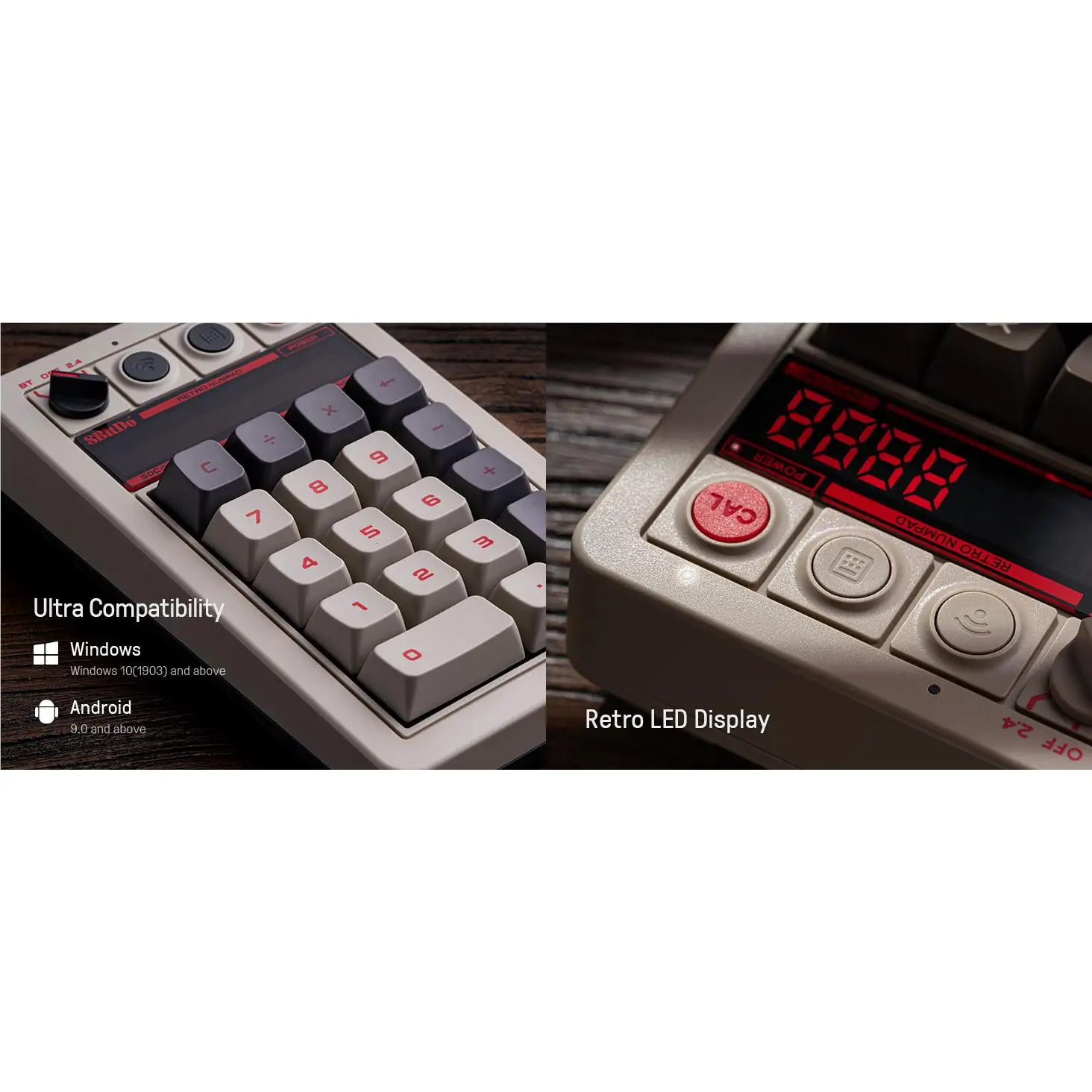
Few peripherals make people say they “actually want to do math,” but the 8BitDo Retro 18 Mechanical Numpad (N Edition) has inspired exactly that sentiment. Multiple reviewers praise its NES-inspired aesthetic, tactile Kailh Box White V2 switches, and double-duty role as both a PC numpad and standalone calculator. Across platforms, the consensus hovers high, with Amazon UK ratings at 4.6/5 and most tech bloggers calling it a satisfying nostalgia hit. In scoring, it earns a solid 8.7/10 for design cohesion, typing feel, and clever functionality—tempered only by limited customization options and the need for an extra USB dongle in certain setups.
Quick Verdict: Conditional buy—excellent for retro fans and heavy number-crunchers, less so for macro/programmable enthusiasts.
| Pros | Cons |
|---|---|
| Retro NES, Famicom, C64, and Model M matching editions | No backlighting |
| Hot-swappable Kailh Box White V2 switches | Requires extra USB port for standalone use |
| Functions as both numpad and calculator | No macro or keybinding software support yet |
| Satisfying tactile/clicky feel | Large USB-A receiver feels clunky |
| Solid aluminum plate construction | Pricey for niche use case |
| Long 160-hour battery life | Windows-only app shortcut |
| Cohesive styling with matching keyboards | Limited software integration |
Claims vs Reality
Marketing from 8BitDo presents the Retro 18 as a versatile “2-in-1 numpad and standard calculator” with hot-swappable mechanical switches, n-key rollover, and multi-mode connectivity (Bluetooth 5.0, 2.4GHz, USB). In promotional terms, it’s positioned as a fully integrated part of their retro keyboard ecosystem, promising that extra layer of input convenience.
Digging deeper into user reports, the calculator mode genuinely lives up to the hype. Reddit user feedback repeatedly emphasizes the charm and tactile joy of pressing physical calculator keys, especially for office setups. One GamesRadar reviewer confessed: “It gives me nothing but joy every time I have to run some numbers.” For Windows users, the calculator shortcut works as promised, instantly launching the OS’s native app.
However, in reality, the software control is far more limited than marketing implies. While the unit supports the 8BitDo Ultimate Software v2, multiple testers noted that “for now, there’s no keybinding or macro options.” This means it functions as a standard input device only—great for number entry, less ideal for complex shortcuts or gaming macros.
Cross-Platform Consensus
Universally Praised
The standout universal praise concerns build quality and tactile experience. Retro Handhelds summed this up with unfiltered enthusiasm: “Button presses feel so good! It has a great clicky-clack sound and feels very tactile… It just feels right altogether.” This feedback applies equally to gamers entering scores, teachers grading papers, or accountants who appreciate mechanical feedback.
The retro color schemes earn high marks from users pairing the pad with matching keyboards. Lon.TV’s Lon Seidman highlighted the aesthetic synergy: “My Retro 18 matched up perfectly with the NES-style keyboard I already have.” This coherence is a major selling point for collectors or those who curate themed desktop setups.
Durability is another point of consensus. With a sturdy aluminum plate and dye-sub PBT keycaps, buyers feel confident in longevity. MaxGaming noted that this construction “ensures durability and long-lasting use,” appealing to heavy typists who worry about key wear.
Battery life impresses practically everyone. The 1000mAh cell and claimed 160-hour endurance were echoed in real-world positive anecdotes—users appreciate not having to recharge often, especially in Bluetooth mode.
Common Complaints
Software support (or lack thereof) dominates the complaint list. While many hoped for macro programmability, current firmware only facilitates updates—not custom key mapping. GamesRadar cautioned potential buyers: “It doesn’t look like 8BitDo’s software reaches into the numpad yet.”
Another friction point is physical connectivity. The bundled USB-A dongle is large by modern standards. For those already using a wireless 8BitDo keyboard, a second USB port is needed for independent 2.4GHz use. Lon Seidman advised that “Bluetooth is likely the best solution” to avoid port waste.
For low-light users, the absence of backlighting is a practical drawback. As Lon.TV stated, “This might be a drawback for those who need to see the keys in low light,” though touch typists may not mind.
Divisive Features
The novelty of calculator mode polarizes buyers. Enthusiasts adore it—Retro Handhelds called it “so much fun to use and feels so great”—while some see it as gimmicky, given smartphones already handle calculations easily. Professionals truly crunching numbers daily find it beneficial; casual typists might rarely toggle the mode.
Retro styling itself also divides opinion. Nostalgic users gush over NES, Famicom, and C64 editions; minimalists or non-gamers may find the aesthetic too niche for formal settings.
Trust & Reliability
No scam concerns surfaced in Trustpilot data, with legitimate purchases arriving as described. Reliability in terms of build held up well—those who paired it with keyboards from late 2023 report consistent switch feel months later. The hot-swappable PCB is also seen as future-proof, letting users modify switches without soldering.
On firmware updates, users appreciate that support exists, even if limited to maintenance rather than functional expansion. That suggests steady manufacturer engagement, albeit not at the pace some feature-hungry buyers desire.
Alternatives
Within the data, no direct competitor matches its retro aesthetic and calculator function. Buyers often compare it more broadly to standard wireless mechanical numpads or programmable macro pads. For those seeking deep macro support, commenters point to other brands that trade retro style for functionality—but sacrifice the visual cohesion 8BitDo offers across its keyboard line.
Price & Value
At $44.99 (£39–42), it sits at the higher end of numpad pricing, largely due to its mechanical build, hot-swap capability, and themed editions. On eBay, occasional sales dip to $39.99, suggesting mild discount potential.
Community buying tips recommend pairing purchases with 8BitDo’s matching keyboards to maximize the visual and tactile coherence—many call it a “set” worth the combined cost. Resale value for retro-themed 8BitDo hardware tends to remain strong due to collector interest.
FAQ
Q: Does the numpad work on macOS?
A: Yes in numpad mode, but the Windows calculator app shortcut will not function. Mac users can still switch to standalone calculator mode for independent calculations.
Q: How long does the battery really last?
A: Most users report close to the claimed 160 hours on Bluetooth. Heavy daily use might require charging every two to three weeks.
Q: Can I program my own macros?
A: Not yet. Current firmware only supports updates; macro and keybinding functions are absent, though future support is possible.
Q: Is it noisy?
A: With Kailh Box White V2 switches, it has a distinct clicky sound. Great for tactile typists, potentially distracting in shared spaces.
Q: Does calculator mode send inputs to the computer?
A: No. In calculator mode, it disables host input and uses the numpad purely as a standalone calculator.
Final Verdict: Buy if you’re a retro gaming fan, keyboard collector, or number-heavy professional who values tactile mechanical feel and desk aesthetic. Avoid if you expect programmable macros or work in low-light conditions needing backlit keys. Pro tip from the community: use Bluetooth to save USB ports and pair with a matching 8BitDo keyboard for the ultimate themed setup.





